AlgoSpecial_TrendMatrixPro — The Complete Technical Guide to Multi-Timeframe Trend Alignment on MT5
Trial: valid until 05 January 2027 · Full version: $80 — algospecial.com or t.me/bullionstrategy
Keywords: MTF trend indicator MT5, multi timeframe trend dashboard, multiple timeframe moving average indicator, trend matrix MT5, forex trend scanner, higher timeframe trend filter, MT5 dashboard indicator, trend alignment indicator.
The lie of the single timeframe
Every beginner is taught to "trade with the trend," and almost every beginner then does the opposite of what that actually requires. They open one chart, pick a timeframe that feels comfortable, and call whatever that chart is doing "the trend." But markets are fractal: the same instrument can be bullish on H1, bearish on H4, and bullish on D1 at the same moment, and all three readings are simultaneously true. Trading one timeframe in isolation means you are blind to the two-thirds of the structure that will decide whether your entry survives.
AlgoSpecial_TrendMatrixPro exists to remove that blindness. It is a MetaTrader 5 dashboard that evaluates a fast/slow moving-average relationship on six higher timeframes at once — M15, M30, H1, H4, D1 and W1 — and renders them as a single, colour-coded panel. In one glance you know whether the market is aligned, diverging, or trapped in a range, without opening six charts or doing mental arithmetic across them.
This guide covers the theory of multi-timeframe analysis, the exact detection logic inside the engine, every input, how to read the panel, and how to convert MTF alignment into a repeatable, rules-based trading process.
1. Why timeframe alignment is the real edge
Multi-timeframe (MTF) analysis is not about collecting opinions; it is about nested structure. Price on a lower timeframe is a magnification of a small segment of the higher timeframe. When the higher timeframe is trending up, lower-timeframe pullbacks are, more often than not, continuation opportunities rather than reversals. When the higher timeframe is ranging, the same lower-timeframe "breakout" is far more likely to fail.
The practical edge comes from a simple asymmetry: aligned trends produce fewer, larger, higher-quality moves; misaligned timeframes produce chop. If you only trade when the timeframes agree, you trade less — but the trades you do take sit on the right side of the dominant flow. This is the same logic used by institutional desks that separate a "bias" timeframe from an "execution" timeframe.
The classic mistake is confirmation bias: a trader who wants to buy finds a timeframe that looks bullish and ignores the rest. TrendMatrixPro makes that impossible — the whole matrix is visible, so a bullish M15 sitting under a bearish H4 and D1 is immediately obvious as a counter-trend setup.
2. The mechanism: fast/slow moving-average cross per timeframe
The engine is deliberately simple and transparent. For each enabled timeframe it creates two independent moving-average handles:
- a fast MA (default 10) and a slow MA (default 30),
- using a configurable method (SMA, EMA, SMMA or LWMA) and applied price (close, open, high, low, median, typical or weighted).
The rule is binary and objective:
- Fast > Slow → BULLISH (green row)
- Fast < Slow → BEARISH (red row)
- Fast == Slow → NEUTRAL (slate row)
- Handle not ready → N/A
Because each timeframe is evaluated independently with its own handles, there is no leakage between them: the H4 reading cannot be polluted by the M15 reading. The indicator recalculates on every new chart bar by default, and you can optionally display the raw fast/slow values so you can measure how strong the alignment is, not just its direction.
A subtle but important design choice: TrendMatrixPro does not require the terminal's built-in MA indicator. It creates its own handles internally, so its values are self-contained and reproducible. If a timeframe's handle fails to create (for example, an unsupported period on a particular symbol), the indicator skips that row gracefully instead of failing the whole panel.
3. Every input parameter, explained
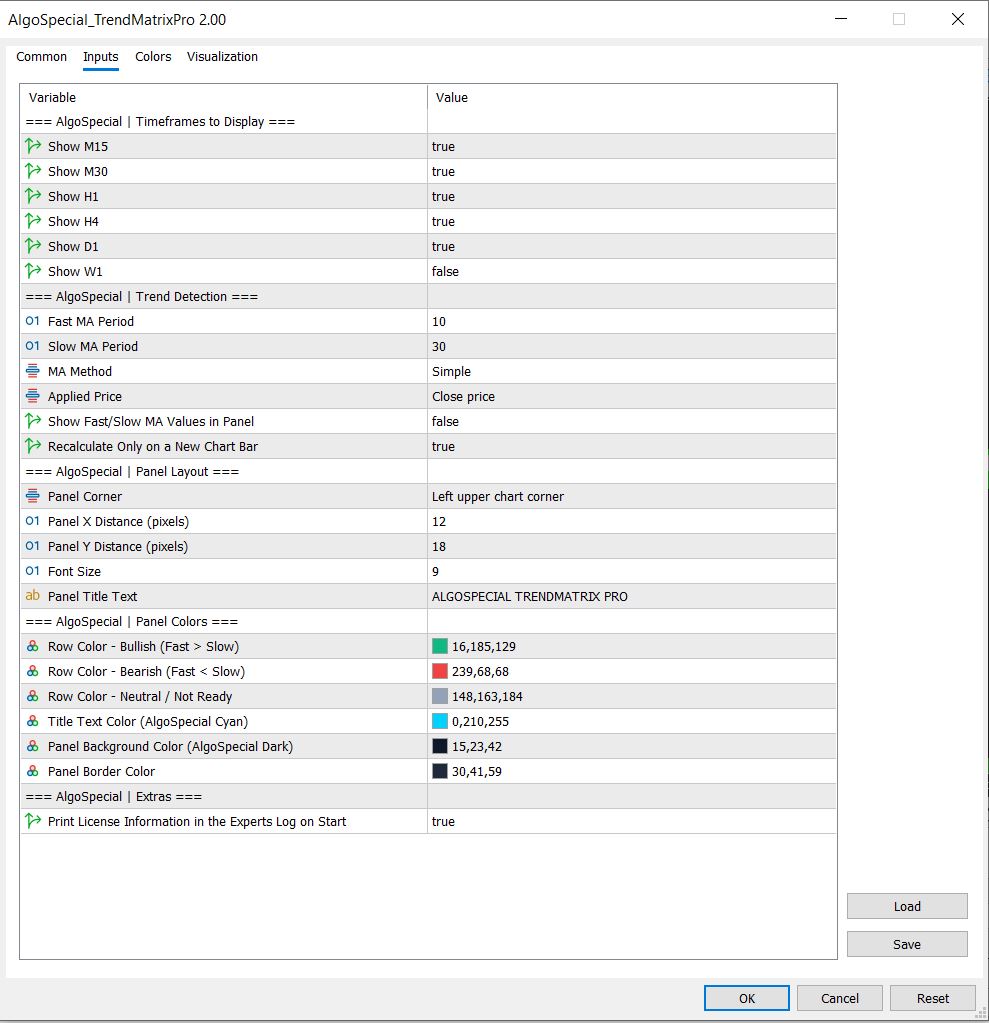
Timeframes to Display
- Show M15 / M30 / H1 / H4 / D1 / W1 — defaults: M15–D1 on, W1 off. Enable exactly the timeframes you actually use. Fewer rows mean a faster read and lower CPU cost.
Trend Detection
- Fast MA Period — default 10. The responsive line.
- Slow MA Period — default 30. The structural line. Fast must be smaller than slow.
- MA Method — default SMA. EMA reacts faster and is popular intraday; SMA is smoother for bias; SMMA and LWMA are available.
- Applied Price — default PRICE_CLOSE. Try PRICE_HL2 (median) or PRICE_TYPICAL for a less noisy reading.
- Show Fast/Slow MA Values in Panel — default false. Turn on to see the actual numbers for confluence scoring.
- Recalculate Only on a New Chart Bar — default true. Throttles refreshes to one per bar, which keeps CPU usage minimal even on many instruments.
Panel Layout & Colors
- Panel Corner / X / Y — place the panel anywhere.
- Font Size — default 9.
- Panel Title Text — default "ALGOSPECIAL TRENDMATRIX PRO"; set your own branding.
- Bullish / Bearish / Neutral colours — default AlgoSpecial green `16,185,129`, red `239,68,68`, slate `148,163,184`.
- Title / Background / Border colours — default AlgoSpecial cyan and dark `15,23,42`.
Extras
- Print License Information in the Experts Log on Start — default true.
4. Reading the panel
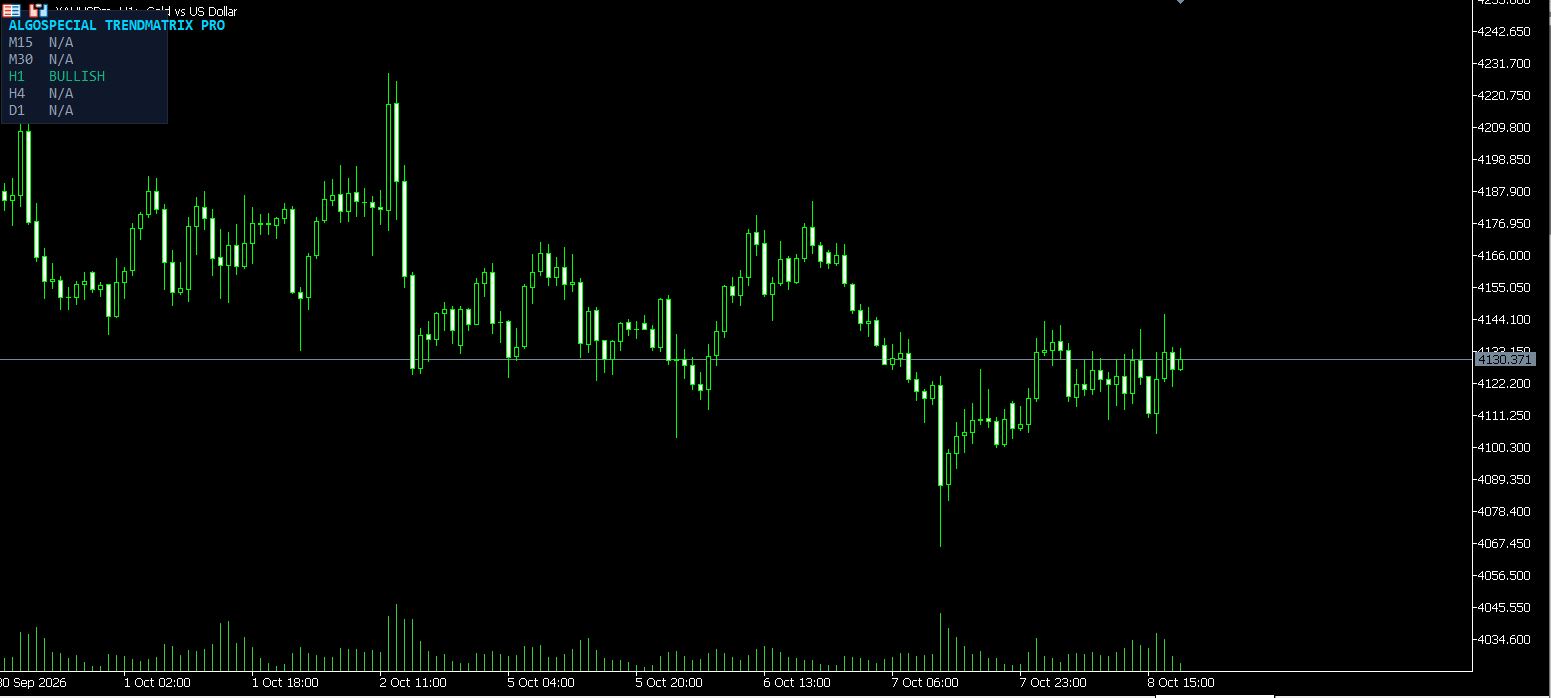
The chart screenshot above shows the panel with M15 and M30 reading N/A (handles still warming up) and H1 reading BULLISH while H4 and D1 read N/A. This is exactly the information that matters: it tells you which timeframes are ready and how they currently align.
A practical reading method:
- Read top-down. Start at the highest timeframe (D1 or W1). That is your bias.
- Count alignment. How many consecutive timeframes agree? Three or more in one direction is strong; one against four is a warning.
- Spot the "first divergence." The point where the matrix flips from bullish to bearish (or vice versa) is often where the battle is happening — the lower timeframes have turned but the higher have not, or the reverse.
- Use N/A as information. A row reading N/A means the engine has not gathered enough bars — do not trade off a half-warm matrix.
5. Turning alignment into a process
- Top-down entry filter. Require H1/H4/D1 to agree before you take a lower-timeframe entry. This single rule removes most counter-trend losses.
- Bias for EAs. The same logic is the natural external bias source for an Expert Advisor: read the higher-timeframe direction, then let the lower-timeframe system execute only in that direction.
- Range detection. When the matrix shows a mix of BULLISH and BEARISH with no clear majority, the market is ranging — switch to mean-reversion tools (like a divergence or FVG tool) rather than breakout logic.
- Confluence stack. Pair TrendMatrixPro (bias) with AlgoSpecial_ImbalanceZoneX (entry timing), AlgoSpecial_LevelHunterPro (levels) and AlgoSpecial_DivergenceRadar (momentum) for a complete top-down framework.
6. Instruments and timeframes
TrendMatrixPro works on anything MT5 can chart: forex majors and crosses (EURUSD, GBPUSD, USDJPY, GBPJPY), gold (XAUUSD), indices (US100, US30, GER40), and crypto (BTCUSD, ETHUSD). It is timeframe-agnostic — it shows timeframes rather than being tied to one — so it is equally useful to a scalper reading M15/H1 alignment and a swing trader reading H4/D1/W1.
7. Risk and prop-firm notes
For prop-firm and low-drawdown accounts, an MTF filter is one of the highest-value additions: it reduces trade frequency and removes the counter-trend entries that produce the deepest drawdowns. Combine it with a fixed per-trade risk and a session filter to stay within daily-loss rules.
8. Installation
- Copy `AlgoSpecial_TrendMatrixPro.ex5` into `MQL5\Indicators\`.
- Refresh the Navigator and attach it to any chart.
- Load `AlgoSpecial_TrendMatrixPro.set` from the Inputs tab for the tested defaults.
- Toggle only the timeframes you trade.
9. Download
The compiled EX5 and ready SET are free to download, with a trial valid until 05 January 2027. Full version $80 — algospecial.com or t.me/bullionstrategy.
10. Advanced: building an MTF alignment score
The panel gives you six binary readings; the next level of skill is to convert them into a single, comparable alignment score you can act on mechanically. A simple and effective method: assign +1 to each bullish row, −1 to each bearish row, and 0 to neutral/N-A, then sum. A reading of +4 or higher across six timeframes is strong bullish alignment; −4 or lower is strong bearish; anything between −2 and +2 is a range and should be traded with mean-reversion tools, not breakouts.
You can refine the score with weighting: give the higher timeframes more weight (e.g., D1 and W1 count double) because they dominate the directional outcome. This produces a weighted bias number that is far more stable than reading a single timeframe, and it can be exposed to an Expert Advisor as an external filter.
11. Why moving-average alignment actually works
It is worth understanding why a fast/slow MA cross carries information, because it explains the indicator's behaviour and its limits. A moving average is a smoothed estimate of the central tendency of price over a window. When the fast average rises above the slow average, the recent central tendency is above the longer-run central tendency — in plain terms, the market's short-term "centre of gravity" has shifted up. That shift is the mathematical definition of a trend emerging. When several timeframes agree, the centres of gravity at multiple scales are aligned, which is precisely the condition under which trend-following pays.
The limit is lag: an MA is a trailing estimate, so alignment confirms a trend that is already underway. TrendMatrixPro is therefore a filter, not a predictor — it keeps you on the right side of an established move and keeps you out of counter-trend traps. Combined with a leading entry trigger (a fair value gap or a level reaction), it becomes a complete system.
12. Choosing timeframes by trading style
The matrix is flexible because the timeframes are inputs. Match them to your holding period:
- Scalper (minutes–hours): show M5 (as the chart), then M15, M30, H1, H4. Bias from H1/H4; execution on M5.
- Intraday (hours): show M15, M30, H1, H4, D1. Bias from H4/D1; execution on M15.
- Swing (days–weeks): show H1, H4, D1, W1. Bias from W1/D1; execution on H4.
- Position (weeks–months): show D1, W1, MN1 (via the underlying logic) with longer MA periods.
A practical rule: never let the highest timeframe in your matrix be the one you execute on. The top of the matrix is context; the bottom is execution.
13. Cross-instrument context
TrendMatrixPro reads a single symbol at a time, but the best traders read relationships. USD pairs share a common driver — the US dollar — so when EURUSD, GBPUSD and AUDUSD all read BULLISH on H4, you are almost certainly watching dollar weakness, and the signal is more robust than a single pair's reading. Likewise, gold (XAUUSD) frequently moves inversely to a strong dollar and with risk-off flows; a bullish gold matrix alongside bearish USD-pair matrices is a coherent macro picture. Indices often share a risk-on/risk-off driver with each other.
Use the matrix on two or three correlated symbols and look for coherence. When the readings tell one consistent story, position size with confidence; when they conflict, the market is undecided and you should trade smaller or stand aside.
14. Parameter tuning matrix
| Style | Fast / Slow | MA Method | Applied Price | Update |
|---|---|---|---|---|
| Scalping | 8 / 21 | EMA | Close | New bar |
| Intraday | 10 / 30 | EMA | Close | New bar |
| Intraday (smooth) | 20 / 50 | SMA | HL2 | New bar |
| Swing | 20 / 50 | SMA | Close | New bar |
| Swing (slow) | 50 / 200 | SMA | Close | New bar |
Shorter fast/slow pairs flip more often and suit fast execution; longer pairs are steadier and suit bias. If the matrix flips constantly, lengthen the periods; if it lags too much, shorten them.
15. Common mistakes
- Trading the matrix's highest timeframe directly. The top rows are context, not entry signals.
- Ignoring N/A rows. A half-warm matrix is not a signal; wait for handles to load.
- Fighting one strong higher timeframe. If D1 is strongly bearish, do not take longs just because M15 flipped green — that is the exact trap the tool exists to prevent.
- Over-tuning. Changing periods constantly destroys the consistency that makes the tool useful. Pick a set and keep it.
- Treating a mixed matrix as bullish or bearish. A 3-3 split is a range; trade it as one.
16. Backtesting and forward-testing notes
Because the panel reads moving-average values, it is stable and reproducible. To validate a setting, scroll back on a symbol and mark every point where the matrix reached ±4 alignment; then measure how the price behaved over the following N bars in the direction of alignment versus against it. On trending instruments you will typically find that high-alignment readings precede larger average moves and smaller average drawdowns than mixed readings — the empirical basis for using alignment as a filter.
17. Quick-reference cheat sheet
- The highest timeframe in your matrix is the bias; the lowest is the execution. Never trade the top row directly.
- Score the matrix: +1 bullish, −1 bearish, 0 neutral. +4 or better = strong bullish alignment; −4 or worse = strong bearish; −2 to +2 = range.
- A row reading N/A means the handles are still warming up — it is not a signal.
- EMA 10/30 for intraday responsiveness; SMA 20/50 for smoother swing bias; 50/200 for position bias.
- Enable only the timeframes you actually trade; fewer rows mean a faster, clearer read and lower CPU use.
- Never fade a strongly aligned higher timeframe — that is the exact mistake the tool exists to prevent.
- Use the matrix as a gate, then trigger entries with a fair value gap, a level reaction or a divergence.
- Keep your periods fixed; re-tuning daily destroys the consistency that gives the filter value.
- On correlated symbols (USD pairs, gold, indices), require coherent readings before you size up.
- Leave "Recalculate Only on a New Chart Bar" on for heavy multi-symbol setups.
- If the matrix flips constantly, lengthen the fast/slow periods; if it lags, shorten them.
- Set the panel title, corner and colours once to match your template, then stop looking at the settings and start reading the rows.
FAQ
Is AlgoSpecial_TrendMatrixPro free? Yes — free `.ex5` + `.set` download with a trial until 05 January 2027.
What timeframes does it show? M15, M30, H1, H4, D1 and W1 — each toggleable.
Can I use it as an EA trend filter? Yes; the MTF logic is designed to act as an external higher-timeframe bias filter.
Which MA method should I use? EMA for responsiveness, SMA for smoother bias — both selectable.
Does it repaint? No; it reads moving-average values, which are stable on closed bars.
Does it work on gold, indices and crypto? Yes — any MT5 symbol.
Why does a row show N/A? The timeframe's MA handles have not accumulated enough bars yet; wait for them to warm up.
Does it need internet or DLLs? No — pure MQL5, fully offline.
Risk disclaimer: educational trading software, not investment advice. Test on demo first. See algospecial.com for the full disclaimer.
Free Download
The compiled MT5 indicator and the ready preset are free to download. Trial valid until 05 January 2027. The MQL5 source is not included; the full version is $80.





