Free MT5 Asia London NY Liquidity Engine
A session-liquidity indicator for traders who study the Asia range, London sweep, and New York decision model. The engine maps Asia high/low, watches London raid behavior, compares continuation versus reversal statistics, then prints entry, stop loss, TP1, TP2, confidence and backtest sample context on the chart.
Compiled EX5 only. MQ5 source code is not included in this free download.

Important Trading Notice
This indicator does not predict markets with certainty and does not guarantee a win rate. It uses session structure, OHLC history and internal simulation to support decision-making. Real results can differ because of broker server time, spread, slippage, news, low liquidity, execution delay and symbol-specific volatility.
Complete Workflow: Asia Range To London Raid To New York Decision
The indicator is built around a clean intraday market story. Asia establishes a range. London often raids one side of that range. New York can either continue the raid direction or reverse back into the range. The indicator builds both continuation and reversal plans, internally tests past sessions, and in Auto Best mode chooses the side with stronger available evidence.
| Stage | What The Engine Measures | How A Trader Uses It |
|---|---|---|
| 1. Session map | Asia start/end, London start/end and New York start/end using broker server hour inputs. | Align the indicator to your broker time so the Asia/London/NY model is not shifted. |
| 2. Asia range | Asia high, Asia low and range size in pips. | Filters abnormal days by minimum and maximum Asia range, so tiny or oversized ranges can be ignored. |
| 3. London sweep | Whether London breaks Asia high, Asia low, both, or neither. | The setup only becomes valid when the selected rules detect a London liquidity event. |
| 4. Continuation plan | BUY STOP after Asia high sweep or SELL STOP after Asia low sweep. | Used when historical samples favor follow-through in the sweep direction. |
| 5. Reversal plan | SELL LIMIT after Asia high raid or BUY LIMIT after Asia low raid. | Used when historical samples favor a return back into the Asia range during New York. |
| 6. Entry, SL and targets | Entry buffer, stop buffer, reward:risk, PDH/PDL target option and price normalization. | Shows a clear plan instead of a vague arrow: entry, SL, TP1 and TP2. |
| 7. Internal backtest | Past valid days, wins, losses, win rate and number of sample cases. | Gives context for whether continuation or reversal has recently worked better for that symbol/session setup. |
| 8. Confidence score | Sample count, win rate, valid Asia range, PDH/PDL proximity and London sweep quality. | Helps distinguish a low-information session from a cleaner, historically supported session plan. |
Dashboard Lines Explained
The selected trade model, such as BUY STOP continuation or BUY LIMIT reversal, plus confidence out of 100.
Entry price and stop loss calculated from Asia/London levels plus input buffer pips.
TP1 follows the configured reward:risk. TP2 can use previous day high/low when enabled and valid.
The session range that becomes the core liquidity map for the day.
Shows whether London swept Asia high, swept Asia low, or failed to create a valid sweep.
Displays internal wins, losses, win rate and sample count for the chosen continuation or reversal side.
Input Parameters Explained
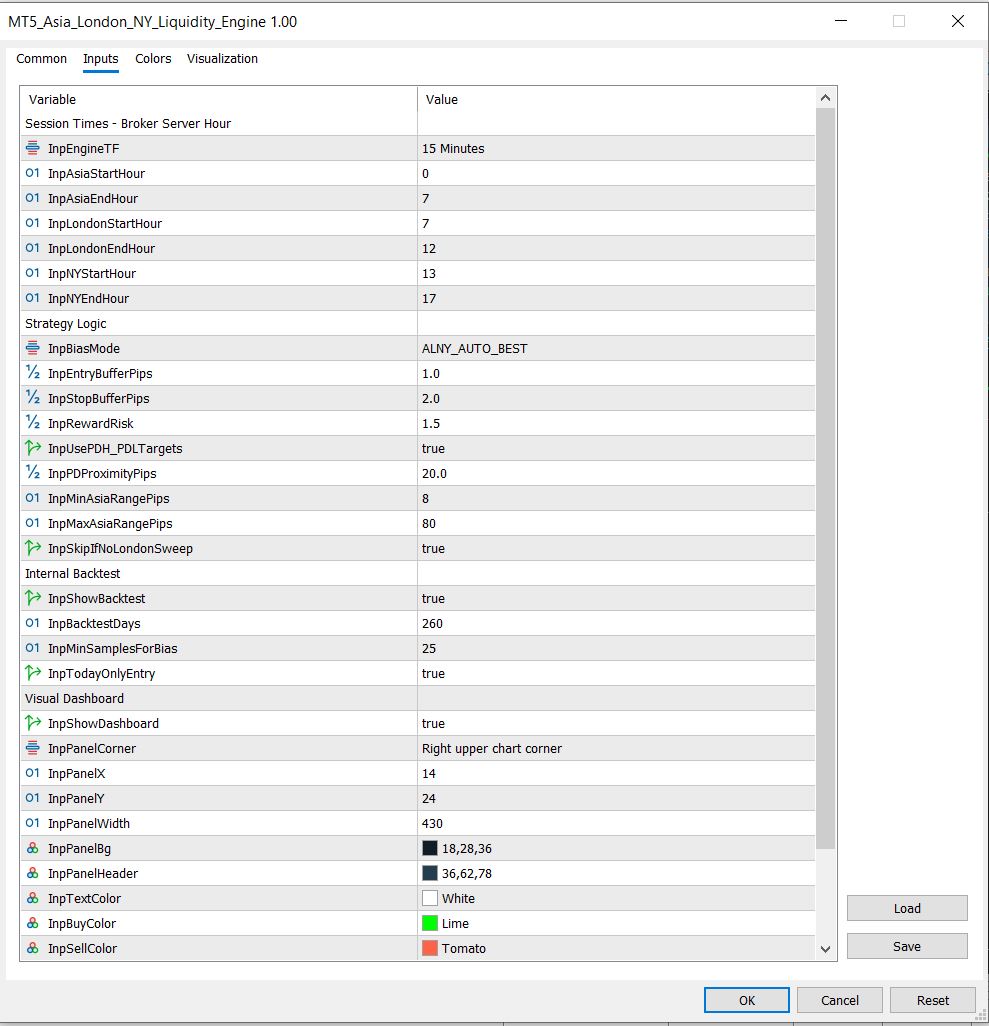
The default preset is designed as a starting point. The most important settings are the broker server session hours, the engine timeframe, bias mode, buffer pips, reward:risk and backtest days.
| Input Group | Meaning |
|---|---|
| Session Times | Defines Asia, London and NY windows using broker server hour. This is the first thing to adjust if your broker time differs. |
| Engine TF | The timeframe used for internal session mapping. Default M15 gives enough intraday detail without becoming too noisy. |
| Bias Mode | Auto Best compares continuation versus reversal stats. Manual modes force only continuation or only reversal. |
| Entry Buffer / Stop Buffer | Adds distance around session levels so orders are not placed exactly on obvious highs/lows. |
| Reward Risk | Controls TP1 distance from entry relative to stop size. |
| PDH / PDL Targets | Allows TP2 to use previous day high or low when the target is logically positioned. |
| Asia Range Filter | Filters days where the Asia range is too small or too large for the intended model. |
| Internal Backtest | Controls how many past days are checked and how many samples are required before trusting the bias comparison. |
| Today Only Entry | Keeps the live trade arrow focused on the current session instead of painting many historical entry arrows. |
How To Use It Practically
- Attach the indicator to the symbol you trade, such as GBPJPY, GBPAUD, EURUSD or XAUUSD.
- Set the session hours according to your broker server time, not your local wall-clock time.
- Wait for Asia to complete and London to either sweep Asia high or Asia low.
- If the panel says WAIT, avoid forcing the setup. WAIT usually means the session map is incomplete or no valid London sweep exists.
- If the panel prints ACTION, compare the entry, stop, TP1, TP2, confidence and internal backtest samples with your own risk plan.
- Be extra careful during CPI, FOMC, NFP, central-bank speeches and major market-open spread widening.
What Makes This More Useful Than A Basic Session Box Indicator
It maps Asia high/low, watches London behavior, and creates a New York decision model.
The tool can compare sweep follow-through against range-reversal behavior instead of assuming one rule always works.
It checks previous valid days and prints wins, losses, win rate and case count for the selected side.
Entry, SL, TP1 and TP2 are printed directly on the dashboard.
The engine can use previous day high or low as a logical second target when enabled.
Objects use an indicator-specific prefix and are removed when the indicator is deinitialized.
Installation
- Download MT5_Asia_London_NY_Liquidity_Engine.ex5.
- In MT5, open File > Open Data Folder.
- Copy the EX5 into MQL5 > Indicators.
- Restart MT5 or refresh the Navigator panel.
- Attach the indicator to your chart.
- Download the default SET file, open the indicator Inputs tab, click Load, and select the preset if you want the same starting configuration.
SEO Topics Covered
This page targets low and mid-competition searches around MT5 Asia London NY indicator, London sweep indicator MT5, Asia range breakout MT5, New York reversal indicator, ICT killzone indicator MT5, forex session liquidity indicator, London raid New York reversal and free MT5 liquidity sweep indicator.
Choose the next useful step
Most visitors arrive with one question: build, test, price, or trust. These shortcuts keep the path practical.
