SAFE Trade Copier — Best Free MT5 Trade Copier
The most complete free MT5 trade copier with local + remote copy, full risk management, trade management, and order execution controls. Copy trades between any MT5 accounts — locally via shared file, or remotely via FTP/HTTP. Prop-firm safe with daily loss limits, drawdown guards, and Friday auto-close.
Download Free EX5 Get Custom CopierFile: SAFE-Trade-Copier.ex5 (77 KB) | Platform: MetaTrader 5 | Free forever
SAFE Trade Copier — Input Parameters
Over 40 configurable inputs organized into logical groups. Every risk and trade management feature can be toggled and tuned.
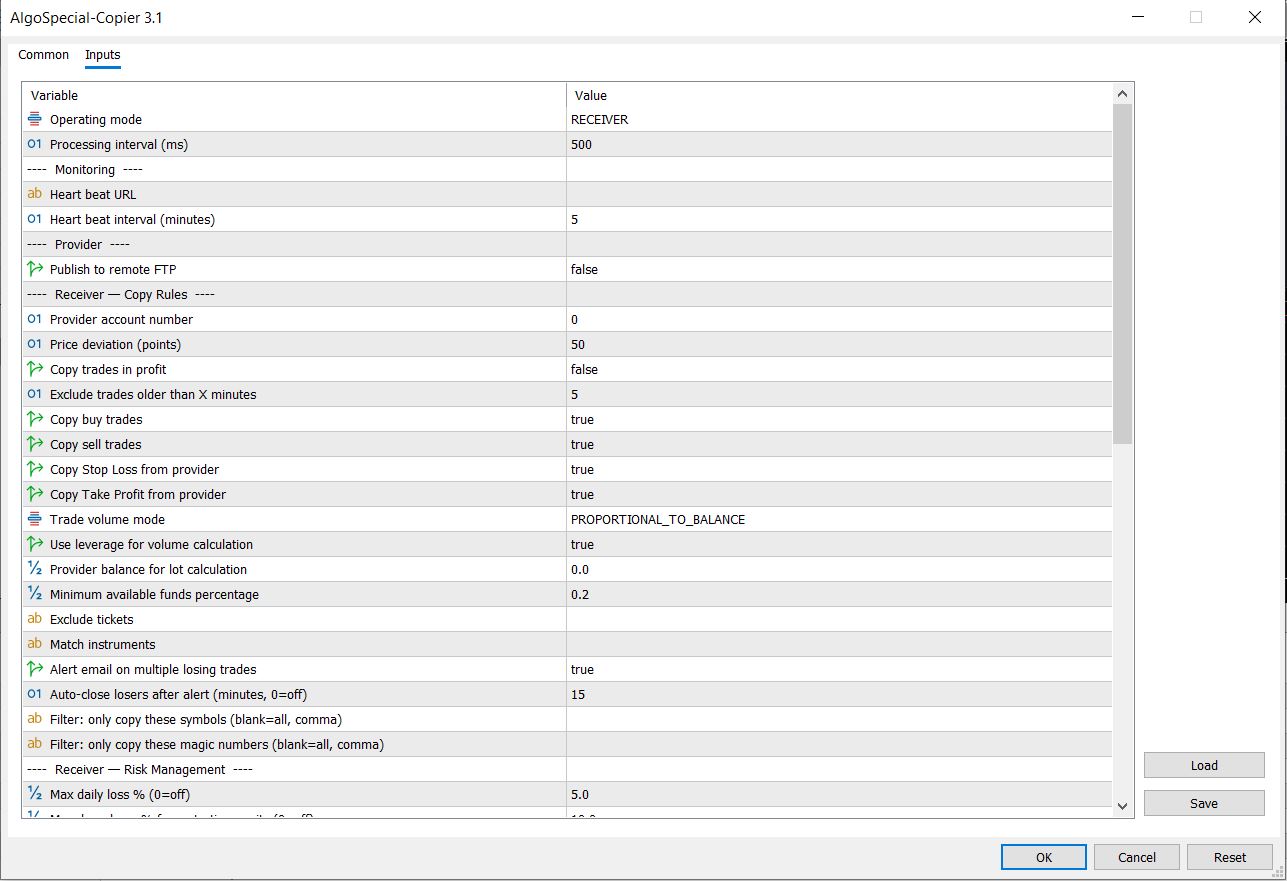
Table of Contents
1. What Is SAFE Trade Copier?
SAFE Trade Copier is a professional MetaTrader 5 Expert Advisor that copies positions from a provider account (master) to one or more receiver accounts (copiers) — in real time, with full control over lot sizing, risk limits, trade management, and order execution.
It solves the core problem every multi-account trader faces: how do I trade once and execute across multiple accounts without manual duplication, without missing trades, and without catastrophic risk spillover?
| Specification | Value |
|---|---|
| Platform | MetaTrader 5 (MT5) |
| Copy Modes | Local (shared file), Remote (FTP upload + HTTP download) |
| Account Types | Hedging & Netting (both supported) |
| Provider-to-Receiver Ratio | 1 provider → unlimited receivers (and vice versa) |
| Lot Sizing Modes | Same as provider, Proportional to balance, Proportional to free margin |
| Configurable Inputs | 40+ parameters across 7 logical groups |
| Heartbeat Monitoring | Yes — HTTP ping to healthchecks.io or any monitoring URL |
| Partial Close Support | Yes — hedged mode + netting volume adjustment |
2. Complete Feature Breakdown
SAFE Trade Copier is organized into 7 functional groups. Each group solves a specific class of problems that generic copiers ignore.
Group 1: Copy Rules
| Feature | Input Parameter | What It Does |
|---|---|---|
| Trade Direction Filter | COPY_BUY, COPY_SELL | Copy only longs, only shorts, or both. Useful for inverse-copy setups. |
| Profit Filter | COPY_IN_PROFIT | Skip copying trades that are already in profit — avoids chasing winners. |
| Age Filter | EXCLUDE_OLDER_THAN_MINUTES | Ignore trades older than X minutes — prevents copying stale positions. |
| SL/TP Control | COPY_SL, COPY_TP | Independently choose whether to copy the provider's stop-loss and take-profit. Set both to false to manage exits manually on each receiver. |
| Symbol Filter | COPY_SYMBOLS | Comma-separated list of symbols to copy. Blank = copy all. Example: "EURUSD,XAUUSD,NAS100". |
| Magic Number Filter | COPY_MAGIC_NUMBERS | Only copy trades with specific magic numbers — filter which EA's trades get copied. |
| Instrument Matching | INSTRUMENT_MATCH | Different brokers use different suffix names. Map EURUSD=eurusd.m or NAS100=Nasdaq 100. Enclosed in brackets: [EURUSD=eurusd.m] |
| Ticket Exclusion | EXCLUDE_TICKETS | Exclude specific positions from being copied. Format: [878221][879545] |
| Auto Symbol Load | Built-in | If a symbol doesn't exist in Market Watch, the copier auto-loads it instead of silently skipping the trade. |
Group 2: Lot Sizing — Scale Across Any Account Size
| Mode | Formula | When to Use |
|---|---|---|
| SAME_AS_PROVIDER | Receiver lot = Provider lot (1:1) | Same account sizes. Mirror trading. Identical risk profiles. |
| PROPORTIONAL_TO_BALANCE | Receiver lot = Prov lot × (Rec Balance / Prov Balance) | Different account sizes (e.g., $5K master → $100K receiver). Most common mode. |
| PROPORTIONAL_TO_FREE_MARGIN | Receiver lot = Prov lot × (Rec Free Margin / Prov Balance) | When the receiver account has existing positions — uses only available margin for calculations. |
Advanced: The copier also accounts for leverage differences between provider and receiver brokers. If the provider uses 1:500 and the receiver uses 1:100, lot sizes are automatically adjusted so the receiver doesn't over-leverage. Set USE_LEVERAGE_FOR_LOT_CALCULATION=false to disable this if both accounts share the same leverage.
Group 3: Copy Infrastructure — Local + Remote
| Feature | How It Works | Use Case |
|---|---|---|
| Local Copy | Provider writes positions to CSV in Terminal\Common\Files\SAFE-Copier\. Receiver reads from the same file. Both terminals on the same machine/VPS. | Multiple MT5 instances on one VPS. Fastest method — sub-millisecond sync. |
| Remote FTP Upload | Provider uploads position CSV to an FTP server. Configure FTP credentials in MT5 Tools → Options → FTP. | Provider on VPS #1, receivers on VPS #2 or separate physical machines. Provider pushes trades out. |
| Remote HTTP Download | Receiver downloads position CSV from any HTTP URL (with optional basic auth). Built-in retry: 3 attempts with 1-second delay. | Receivers on remote servers, laptops, or different locations. Firewall-friendly since it pulls via standard HTTPS. |
| Heartbeat Monitoring | HTTP POST ping to any URL at configurable intervals (default 5 min). Works with healthchecks.io, UptimeRobot, custom endpoints. | Get alerted if your copier terminal crashes, freezes, or loses connection. Critical for prop firm operations. |
| Processing Interval | Configurable in milliseconds (default: 500ms). Lower for near-real-time copy. Raise for VPS resource conservation. | Scalpers: set 250ms. Swing traders: set 1000ms. Balances speed vs. CPU usage. |
3. How It Works — The Execution Engine
SAFE Trade Copier operates on a poll-based synchronization model. Every N milliseconds (default 500ms), the provider writes all current positions to a CSV file, and every receiver reads that file and synchronizes its own positions.
The Sync Algorithm — Step by Step
- Provider writes: All open positions, account metadata (balance, equity, leverage, currency, margin mode, timezone offset), and position-level details (volume, open price, SL, TP, symbol, comment, leverage) to the CSV file.
- Receiver reads: File is opened with
FILE_SHARE_READflag — provider can write while receiver reads without lock conflicts. Header is parsed for account metadata. Each position row is parsed into a structured array. - Position matching: The receiver compares its existing positions against the provider's CSV. Matches are identified via the
[TKT=xxx]comment tag embedded in each copied position, or via a fallback GlobalVariable system that persists through terminal restarts. - Decision tree per position:
- No match found → New position: Passes through all risk filters (max daily loss, max drawdown, symbol filter, magic filter, spread filter, age filter, profit filter, max positions limit). If all pass → calculate lot size using selected mode → place order with retry logic.
- Match found, same volume → No action. Only SL/TP are updated if they differ from the provider (and if COPY_SL/COPY_TP are enabled).
- Match found, volume increased → Partial add. Netting accounts: place an additional order in the same direction. Hedging accounts: no additional action needed (new positions are opened as separate trades).
- Match found, volume decreased → Partial close. Hedging accounts: use
PositionClosePartial(). Netting accounts: place an opposing order to reduce net exposure. Volume state is saved to both a GlobalVariable AND a persistent CSV backup file — so terminal restarts don't lose the current volume state. - Position exists on receiver but NOT on provider → Close. If losing, grouped for multi-loser alert logic. If winning, closed immediately.
4. Competitor Comparison — Best MT5 Trade Copier
Most "free" copiers are stripped-down versions of paid products — they copy lots but lack risk controls, trade management, or remote capabilities. SAFE includes every feature in the free version.
| Feature | SAFE Trade Copier | FX Blue Personal Copier | Forex Copier | Social Trader Tools |
|---|---|---|---|---|
| Price | FREE | $149 one-time | $30 one-time | $15/month |
| Local Copy | Yes | Yes | Yes | No |
| Remote Copy (FTP+HTTP) | Yes | Paid only | No | Yes |
| Proportional Lot Sizing | Yes (3 modes) | Yes | Limited | Yes |
| Trailing Stop | Yes | No | No | No |
| Breakeven Stop | Yes | No | No | No |
| Partial TP | Yes | No | No | No |
| Max Daily Loss Guard | Yes | No | No | No |
| Max Drawdown Guard | Yes | No | No | No |
| Daily Profit Target | Yes | No | No | No |
| Spread Filter | Yes | No | No | No |
| Friday Auto-Close | Yes | No | No | No |
| Order Retry on Failure | Yes (configurable) | No | No | No |
| SL/TP Validation | Yes — auto-adjusts | Not built-in | Not built-in | Not built-in |
| Heartbeat Monitoring | Yes | No | No | Yes (dashboard) |
Bottom line: Competitors charge $30-$149 for fewer features. SAFE includes everything — risk management, trade management, and execution controls — in a single free download. No registration. No email required.
Disclaimer: Feature comparisons based on publicly available product documentation as of July 2026. Feature availability may change. All trademarks belong to their respective owners. This is not an official comparison endorsed by any competitor. Our claims are based on our own analysis and testing.
5. Risk Management — Prop-Firm Safe Architecture
The most dangerous thing about any trade copier is that it amplifies risk as fast as it amplifies opportunity. If your master account takes 10 consecutive losses, an unprotected copier takes exactly the same 10 losses across every receiver — multiplied by whatever lot-size ratio you configured. SAFE Trade Copier has a dedicated risk layer that runs BEFORE any position sync.
| Risk Control | Parameter | Behavior When Hit |
|---|---|---|
| Max Daily Loss | MAX_DAILY_LOSS_PERCENT (default 5%) | All new position copying stops for the rest of the day. Tracked from daily-start balance, resets at midnight. Existing positions can still be managed (SL trailing, breakeven, close) but no new trades open. |
| Max Drawdown | MAX_DRAWDOWN_PERCENT (default 10%) | Tracked from the balance at EA initialization (g_startBalance). Stops all copying when equity drawdown exceeds the threshold. Persists across days — does not reset. |
| Max Risk Per Trade | MAX_RISK_PER_TRADE_PERCENT (0=off) | Caps the position size so that the SL distance (in monetary value) does not exceed X% of the receiver account balance. Prevents over-leveraging on wide-stop setups. |
| Daily Profit Target | DAILY_PROFIT_TARGET_PERCENT (0=off) | Stops copying new trades once daily profit exceeds target. Ideal for prop firm traders who need to hit X% and stop — prevents overtrading after the target is met. |
| Min Available Funds | MIN_AVALABLE_FUNDS_PERC (default 20%) | Reserves a percentage of the receiver account balance. No new trades are opened if free margin falls below this threshold. Prevents margin calls on the receiver. |
| Max Positions | MAX_POSITIONS, MAX_POSITIONS_PER_SYMBOL | Global position cap and per-symbol position cap. Limits total exposure and prevents over-concentration on a single instrument. |
| Multi-Loser Alert | ALERT_MULTIPLE_LOSERS_CLOSE | Sends email alert when multiple losing positions would be closed simultaneously (suspicious scenario). Configurable auto-close timeout (AUTO_CLOSE_LOSERS_AFTER_MINUTES) closes them automatically after X minutes if unhandled. |
6. Trade Management — Full Control Over Every Position
Most copiers stop at "copy the lot size and TP/SL." SAFE Trade Copier manages every position on the receiver independently from the provider — you can apply dynamic stops, partial exits, and time-based closures that the provider doesn't even know about.
| Feature | How It Works | Example |
|---|---|---|
| Trailing Stop | Moves SL closer to current price as profit increases. Configurable distance (TRAILING_STOP_POINTS) and step size (TRAILING_STOP_STEP). Only moves SL in the direction of profit — never backwards. | TRAILING_STOP_POINTS=200, STEP=50. Long EURUSD from 1.0850. When bid reaches 1.0875 (250 pts up), SL moves from 1.0825 to 1.0855. When bid hits 1.0900, SL moves to 1.0880. |
| Breakeven Stop | Once profit exceeds BREAKEVEN_TRIGGER_POINTS, SL is moved to entry price + BREAKEVEN_LOCK_POINTS. Locks in a risk-free trade after a threshold is crossed. | TRIGGER=150, LOCK=20. Long XAUUSD from 2643. When profit hits 150 pts, SL moves to 2645 (entry + 20 pts). Trade is now risk-free with 20 pts locked. |
| Partial Take Profit | Closes configurable % of position when a specific risk:reward ratio is reached. Tags the position with "TP1" so partial close fires only once. | PARTIAL_TP_PERCENT=50, RR_RATIO=1.0. When profit equals the initial risk, 50% of position closes. Remaining 50% runs to the full TP or trailing stop. |
| Time Exit | Closes any position that has been open longer than TIME_EXIT_MINUTES regardless of P&L. | TIME_EXIT_MINUTES=480. If a trade is still open after 8 hours, it gets closed at market. Useful for intraday strategies that should not hold overnight. |
| Friday Close | Closes ALL positions on Friday at a configurable GMT hour. Uses the terminal's GMT offset to calculate the correct time regardless of broker server timezone. | FRIDAY_CLOSE_GMT_HOUR=20. Every Friday at 20:00 GMT, all positions are closed. Prevent weekend gap risk on the receiver even if the provider holds over the weekend. |
7. Order Execution — Reliability Layer
Generic copiers fail silently when the broker rejects an order. SAFE Trade Copier has a dedicated order execution layer that detects and resolves the most common failure modes.
| Feature | Problem Solved |
|---|---|
| SL/TP Auto-Validation | If the provider's SL or TP is closer to entry than the broker's minimum stop-level distance, the copier auto-adjusts it outward. Logs a warning so you know it happened. No silent order rejection. |
| Order Retry | If an open, close, or modify request fails (TRADE_RETCODE_REJECT, REQUOTE, etc.), the copier retries up to ORDER_RETRY_COUNT times with ORDER_RETRY_DELAY_MS between attempts. |
| Spread Filter | Blocks entry if the current spread exceeds MAX_SPREAD_POINTS. Prevents high-cost entries during illiquid sessions or news events. The order with retry loop waits for the spread to normalize before placing. |
| Margin Check | Every buy/sell order is pre-checked with OrderCalcMargin(). If the receiver doesn't have enough margin, the order is skipped with an error log — not rejected by the broker mid-execution. |
| Auto Symbol Load | If a symbol doesn't exist in the receiver's Market Watch, the copier calls SymbolSelect() to load it automatically. No "symbol not found" skipped trades. |
| Volume Validation | Calculated lot sizes are validated against SYMBOL_VOLUME_MIN and SYMBOL_VOLUME_MAX, then rounded to SYMBOL_VOLUME_STEP. Never submits an invalid lot size to the broker. |
| File Lock Retry | If the provider is writing the CSV while the receiver reads it, the receiver retries for up to FILE_MAXWAIT_MS (500ms) before giving up. Uses FILE_SHARE_READ flag to minimize lock conflicts. |
8. Installation — 5 Steps
- Download
SAFE-Trade-Copier.ex5from the button at the top of this page. - Copy the file to:
MQL5\Experts\(Open MT5 → File → Open Data Folder → MQL5 → Experts). - Restart MT5 or right-click the Navigator panel → Refresh.
- Attach to any chart. You only need one instance per terminal — it processes all positions on the entire account.
- Configure:
- Set PROVIDER on your master account
- Set RECEIVER on your copier account(s) and enter the provider's account number in PROVIDER_ACCOUNT
- For remote copy: configure FTP (Tools → Options → FTP) on the provider, and set REMOTE_HTTP_DOWNLOAD=true + REMOTE_FILE_URL on receivers
- For monitoring: set HEARTBEAT_URL to any ping endpoint (healthchecks.io recommended — free plan includes 20 monitors)
9. Custom Copier Development — Pricing
The free EX5 covers 95% of use cases. But if you need custom copier features built into your own proprietary EA, we build bespoke trade copiers with any feature you can describe.
Basic Custom Copier
- Local + FTP copy modes
- Proportional lot sizing
- Basic risk limits
- Source code included
Advanced Custom Copier
- Everything in Basic + Web Dashboard
- Telegram/Signal copy integration
- Multi-broker: MT4→MT5 copy
- Inverse copy (fade) mode
- Source code included
Enterprise Copy Network
- Everything in Advanced
- Cloud-based master server
- Real-time web monitoring panel
- Unlimited receivers + load balancing
- White-label with source code
Every custom build follows our standard development process with fixed pricing, written specification, and full source code ownership. See our pricing page for the complete service catalog.
10. FAQ
Is SAFE Trade Copier really free?
Yes. The compiled EX5 is free forever. No registration, no email, no trial expiration. All features are included in the free version. Custom development for additional features is available through our contact page.
Does this work between MT4 and MT5?
SAFE Trade Copier is MT5 only. Both provider and receiver must be on MT5. MT4-to-MT5 copy is available as a custom build — contact us for pricing.
How many accounts can copy from one provider?
Unlimited. The provider writes a CSV file. Any number of receivers can read from it. For remote copy, the FTP server is the bottleneck — but standard shared hosting handles 50+ concurrent readers easily.
Can I copy trades from my mobile MT5?
Mobile MT5 does not support Expert Advisors. The provider must be on desktop MT5. However, the receiver can be on a VPS that copies trades from the desktop provider — you can monitor positions via the MT5 mobile app.
Does this work for prop firm accounts?
Yes. The risk management layer (max daily loss, max drawdown, daily profit target) is specifically designed for prop firm compliance. Use SAME_AS_PROVIDER lot sizing for identical challenge copying. Use PROPORTIONAL_TO_BALANCE for scaling between smaller and larger challenge accounts.
What happens if the provider terminal crashes?
The receiver stops receiving new CSV updates. Existing receiver positions remain open and are managed by the trade management layer (trailing stop, breakeven, Friday close, time exit). The heartbeat monitoring will detect the provider crash if configured.
Can I copy only specific EA trades?
Yes. Use the COPY_MAGIC_NUMBERS filter to specify which magic numbers to copy. Combine with COPY_SYMBOLS to filter by instrument. Together, you can isolate a single EA on a single pair.
Need a Custom Trade Copier?
We build bespoke MT5 trade copiers with web dashboards, Telegram signal integration, multi-broker support, and proprietary features. Fixed-price quotes, tiered pricing, full source code included. See our MT5 EA Development service for details.
Request a Quote




