MT5 Breakout Boxes & Fibonacci Pivots Indicator
Two GMT session breakout boxes, an 11-level Fibonacci pivot suite built from the previous daily candle, confirmed non-repaint arrows, an on-chart candle and spread dashboard, and an automatic trade-plan panel with empirical hold rates. Built for XAUUSD, forex, indices and crypto CFDs — indicator only, it places no trades.
Trial: full feature set, valid until 02 November 2026. After that date the EX5 alerts with contact/pricing details and removes its chart objects. Lifetime license $200 · lifetime + full MQ5 source $1000.
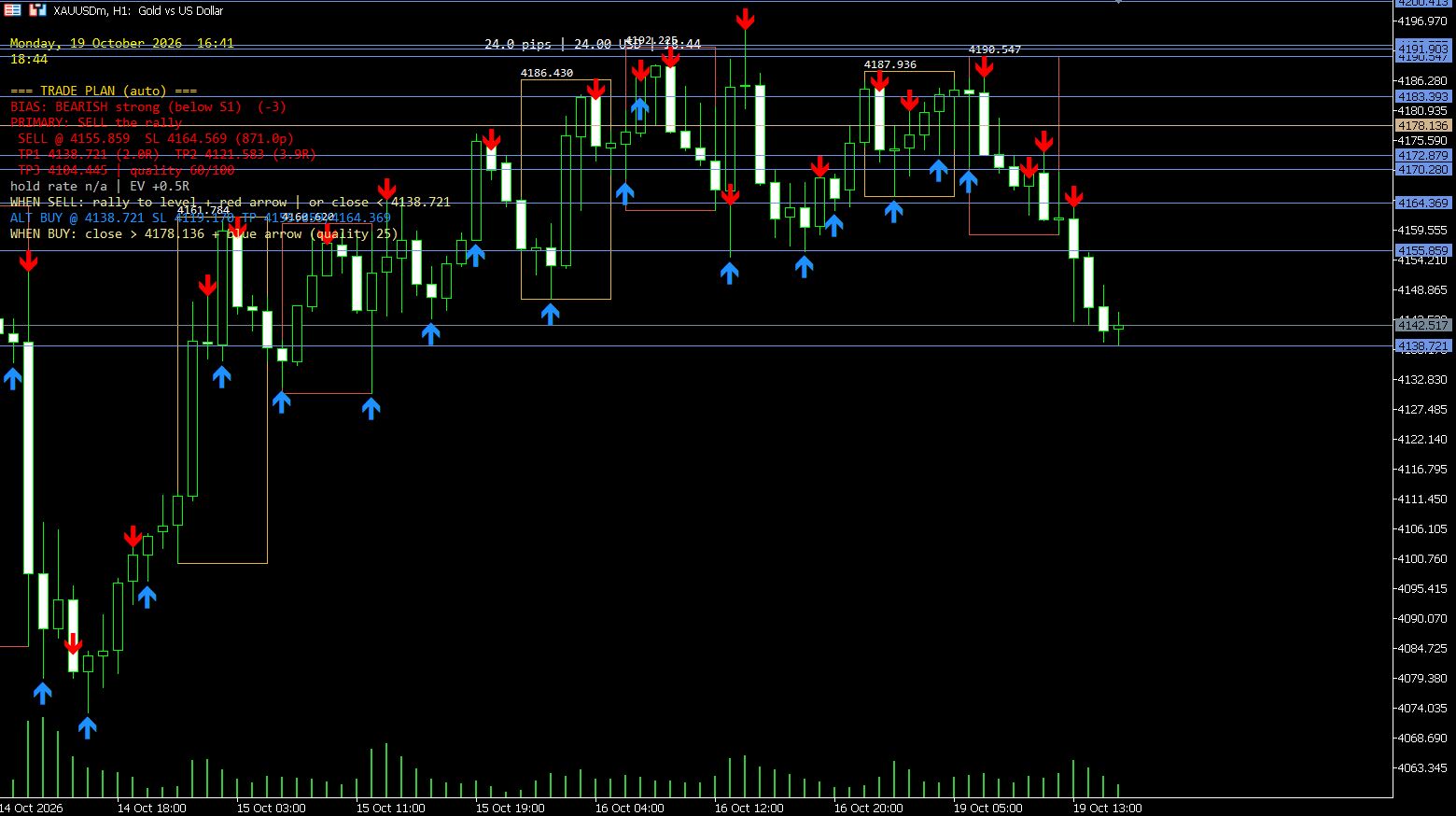
XAUUSDm, H1 — 19 October 2026. Bearish bias below S1, a SELL plan with TP1 at +2.0R and TP2 at +3.9R, swing and breakout arrows, and the ALT BUY reaction level. Hold rate shows n/a because that level type lacked enough matching first-touch samples in the 60-day window.
Honest Scope — Read This First
This is a decision-support indicator, not a trading robot and not a promise of profit. It draws session boxes, pivot levels, arrows and a trade plan from broker OHLC data; it places no orders and cannot access any hidden order book. The hold-rate and EV values in the panel are empirical first-touch statistics measured on the chart's own history — they appear only when enough samples exist (otherwise n/a), and they describe the past, not the future. Always apply your own risk rules.
What the Indicator Draws
The overnight range, wrapping midnight on Mondays to Fridays. Its high and low become the first breakout reference of the day.
The London-morning range. Two independent boxes let you trade the Asia range break and the London range break with the same tool.
Previous-day Pivot, R1, S1, Intraday Long/Short at 0.236 of the daily range, Daily Targets 1 and 2 at 0.618 and 1.0 on both sides, plus today's running Intraday High and Low.
Fractal pivot arrows (strength 5 by default) mark confirmed swing highs and lows with blue buy-side and red sell-side arrows.
The first closed candle beyond a session box edge prints an arrow — no live-bar guessing, no repainting after close.
Auto bias, primary BUY or SELL plan with entry, SL and TP1–TP3 in R multiples, a 0–100 quality score, empirical hold rates and EV, plus an alternate reaction plan.
Session Boxes — The Core Breakout Engine
The indicator builds every box from the M15 candles of the session window and keeps the right edge inset slightly away from the current bar so adjacent boxes never merge into one long rectangle. It detects the broker's server-to-GMT offset automatically and exposes a manual override for brokers with unusual server time.
| Setting | Default | What it does |
|---|---|---|
| Session 1 window | 23:00 → 06:00 GMT | Overnight range; wraps midnight. Fully editable, can be disabled. |
| Session 2 window | 06:00 → 13:00 GMT | London-morning range; fully editable, can be disabled. |
| Box timeframe | M15 | Candles used to measure each session's high and low. |
| History depth | 30 days | How far back the boxes are drawn. |
| GMT offset | Auto | Server time minus GMT, rounded; manual override available. |
| Box extras | On | Price label inside each box, weekday day separators, dotted session-start lines. |
| Right-edge inset | 60 sec | Keeps back-to-back session boxes visually separate. |
Swipe the table horizontally to see all columns →
Breakout logic is simple and visible: while price stays inside the box, the range is the reference; when a candle closes beyond the box high or low, the breakout arrow confirms the direction and the box remains on the chart as the source of the level. Failed breaks inside the box are part of the same story — you can see them and filter them with the pivot confluence and plan quality.
The 11-Level Fibonacci Pivot Suite
Every level is calculated from the previous completed daily candle (H, L, C) and drawn for the current day. The classic floor-trader pivot anchors the bias; the 0.236 and 0.618 levels frame intraday and daily targets.
| Level | Formula | Default multiplier | Typical use |
|---|---|---|---|
| Pivot (P) | (H + L + C) / 3 | — | Daily bias line: above = bullish, below = bearish. |
| Resistance 1 | P + m × (P − L) | 1.0 | First upside target / reaction level. |
| Support 1 | P − m × (H − P) | 1.0 | First downside target / reaction level. |
| Intraday Long | P + m × (H − L) | 0.236 | Shallow intraday pullback support in an uptrend. |
| Intraday Short | P − m × (H − L) | 0.236 | Shallow intraday pullback resistance in a downtrend. |
| Daily Long Target 1 | P + m × (H − L) | 0.618 | Primary upside objective. |
| Daily Long Target 2 | P + m × (H − L) | 1.0 | Extended upside objective. |
| Daily Short Target 1 | P − m × (H − L) | 0.618 | Primary downside objective. |
| Daily Short Target 2 | P − m × (H − L) | 1.0 | Extended downside objective. |
| Intraday High | Today's running high | — | Live intraday liquidity reference. |
| Intraday Low | Today's running low | — | Live intraday liquidity reference. |
Swipe the table horizontally to see all columns →
All multipliers are inputs — if your framework uses different ratios (0.382, 0.5, 0.786), set them and the whole suite, including the trade-plan targets, recalculates.
Swing and Breakout Arrows — Confirmed Bars Only
A fractal high or low must be confirmed by the configured number of bars on each side (default strength 5). Confirmed arrows never disappear.
Printed when a candle closes beyond the session box high or low. The arrow marks the confirmed break, not an intrabar poke.
Arrows are placed on closed bars. The only element that updates intrabar is the live session box being formed — because its range is still growing.
Buy/sell colors, arrow width and vertical offset are inputs, so the chart stays readable next to your own tools.
Auto Trade-Plan Panel — Bias, Levels, Quality, Hold Rate, EV
The panel is the part traders notice first. It reads the current price against the pivot suite and prints a compact plan instead of a vague signal:
- BIAS — e.g. "BEARISH strong (below S1) (-3)" or "BULLISH above Pivot (2)": direction, strength and the level that defines it.
- PRIMARY plan — SELL or BUY with entry, SL in pips, TP1/T2/T3 and the R multiple of each target.
- Quality /100 — confluence score of the setup (bias alignment, level structure and regime context).
- Hold rate — empirical first-touch probability that the level held over the last 60 days, with the ATR-based acceptance threshold; n/a when samples are insufficient.
- EV — expected value of the plan in R, derived from the same hold-rate statistics.
- WHEN BUY / WHEN SELL — the exact trigger sentence, e.g. "WHEN SELL: close < 4158.36 + red arrow (quality 25)".
- ALT plan — the reaction level and instructions if the primary level is reached from the other side.
The plan is honest about uncertainty: if the statistics don't exist, it says n/a instead of inventing a probability. Screenshots on this page show exactly that behaviour.
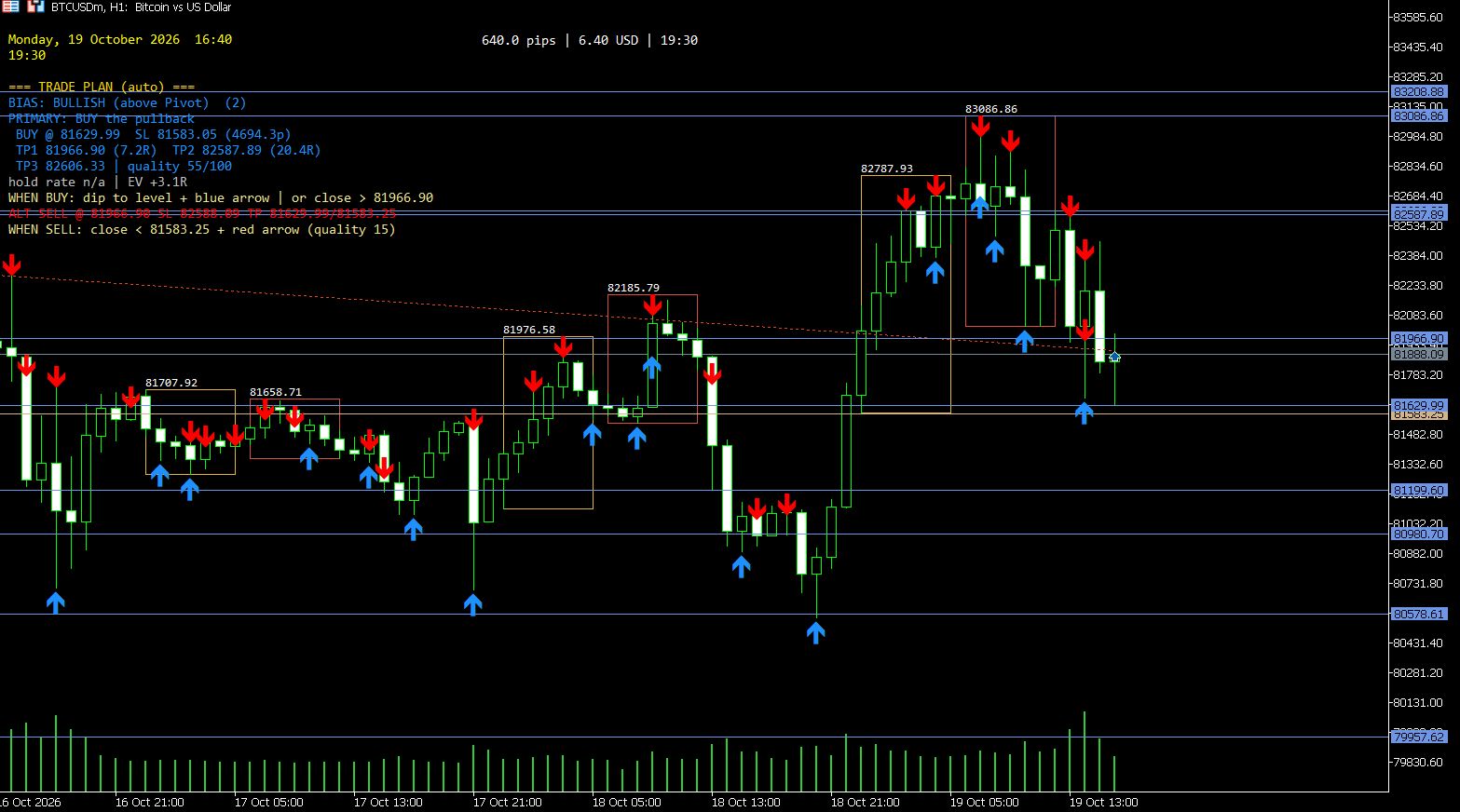
BTCUSDc, H1 — 19 October 2026. Bullish above the pivot, BUY plan with TP1 at +7.2R, TP2 at +20.4R, quality 55/100, hold rate n/a and EV +3.1R. High R multiples are a property of the distance to the next Fibonacci level on this symbol — not a promised outcome.
On-Chart Dashboard
Always know which server day the levels belong to — critical when the broker offset differs from your local time.
The remaining time of the current candle in yellow, so you can judge whether a breakout close is imminent.
Live spread in pips, in account currency and a countdown to the next spread sample — useful before session-open entries.
Optional header text input; empty hides it. Panel position is configurable via X/Y inputs.
Input Groups
| Input group | Purpose |
|---|---|
| General | History days to draw, box timeframe (M15 default), GMT offset (0 = auto). |
| Session 1 / Session 2 | Enable, start and end hours in GMT, color, fill, background drawing, line style and width. |
| Box Extras | Price labels, day separators with weekday names, session start lines, right-edge inset. |
| Arrows | Breakout and swing arrow toggles, fractal strength, colors, size and vertical offset. |
| Trade Plan Panel | Show/hide, panel position, SL buffer pips, minimum SL distance, statistics window (60 days), hold threshold (0.5 × daily range). |
| Pivot Levels | Individual toggles for P, R1/S1, intraday levels, running high/low, daily targets; all multipliers. |
| Dashboard UI | Show/hide, colors, font size, brand line, date/timer and spread block positions. |
Swipe the table horizontally to see all columns →
How To Trade With It — A Practical Workflow
- Mark the context first. Read the BIAS line and the pivot suite. Above the pivot the bias favours buys; below S1 it is strongly bearish.
- Watch the session box. The overnight (23:00–06:00 GMT) and London-morning (06:00–13:00 GMT) ranges define the breakout references.
- Wait for the close. A breakout arrow only prints after a closed candle beyond the box edge. Intrabar pokes are not signals.
- Check confluence. A break into an empty gap toward the next Fibonacci level is cleaner than a break straight into a pivot. The panel's quality score helps you separate the two.
- Use the plan as a template. Entry, SL and TP levels are chart-derived; the hold rate and EV tell you how similar touches behaved historically. If hold rate is n/a, treat the plan as structure only.
- Manage risk yourself. Breakouts fail — especially around news, spread widening and the daily rollover. Size positions by your own rules, not by the panel's R multiples.
Best sessions for this tool: the London open (06:00–09:00 GMT) and the New York overlap often produce the cleanest box-break momentum; the 23:00–06:00 box is most useful when Asian-range compression precedes the London expansion.
Pricing
- Full feature set — same EX5 build
- All sessions, levels, arrows and panel
- Expires 02 November 2026
- Full EX5 indicator, lifetime license
- All sessions, pivots, arrows, dashboard, trade plan
- Use on your own trading accounts
- Everything in the lifetime license
- Full MQ5 source code package
- Modify and adapt the logic under agreement
Payment and delivery are handled manually through the contact page (Telegram @bullionstrategy or the site contact form) so the license can be matched to your account details. The trial EX5 contains the full feature set and is the exact build shown in the screenshots on this page.
Installation — 60 Seconds
- Download the trial MT5_Breakout_Boxes_Fib_Pivots.ex5 above.
- Open MetaTrader 5 → File > Open Data Folder.
- Copy the EX5 into MQL5 > Indicators.
- Restart MT5 or right-click the Navigator and choose Refresh.
- Open your chart (XAUUSDm, forex, indices or crypto) and attach the indicator from the Navigator.
- Leave GMT offset at 0 = auto unless your broker's server time is non-standard; check the boxes against your session hours and adjust the inputs if needed.
Frequently Asked Questions
What exactly does the indicator draw?
Two GMT session boxes (23:00–06:00 and 06:00–13:00), an 11-level Fibonacci pivot suite from the previous daily candle, confirmed swing arrows, closed-bar breakout arrows, an on-chart dashboard with candle countdown and spread, and the automatic trade-plan panel.
Does it repaint?
No signals repaint. Breakout arrows print only after a candle closes beyond the box edge, and swing arrows require a confirmed fractal pivot. The live session box updates while the session is still forming — that is the range being built, not a signal.
Which symbols and timeframes work best?
Any symbol with normal MT5 history: XAUUSD, forex majors and crosses, indices and crypto CFDs. H1 is a good starting point for the trade plan, M15 for faster execution, H4 for wider context. The screenshots show XAUUSDm and BTCUSDc on H1.
How are the trade plan levels calculated?
Bias comes from price relative to the pivot suite. Entry is the actionable level or its retest, the stop sits beyond the next level plus a pip buffer, and TP1–TP3 sit at the following Fibonacci levels with R multiples. Quality is a 0–100 confluence score; hold rate and EV come from empirical first-touch statistics over the 60-day window.
What does "hold rate n/a" mean?
The level type did not have enough matching samples in the statistics window for that symbol. The indicator prints n/a instead of inventing a number. This is intentional — the same honesty rule applies to EV.
Does the indicator place trades?
No. It is an indicator only and cannot open, modify or close orders.
Is the trial really free?
Yes — the EX5 trial costs nothing and includes the full feature set until 02 November 2026. After expiry it alerts with contact/pricing details and removes its chart objects. Lifetime is $200; lifetime plus full MQ5 source is $1000.
Can I use it on more than one chart or account?
The lifetime license covers your own trading use; for multi-account or redistribution terms, ask through the contact page before purchasing.
How do I change the session hours?
Session 1 and Session 2 each have independent start/end hour inputs in GMT. Set them to your preferred ranges, or disable one session entirely. The GMT offset is auto-detected; override it only if your broker uses unusual server time.
Where can I get the source code?
The full MQ5 source code package is available with the $1000 lifetime + source license. Request it through the contact page.
More AlgoSpecial Indicators
Free multi-symbol SMC dashboard: supply and demand zones, BOS/CHoCH, FVG, liquidity, premium/discount and confirmed trade plans.
Free session-liquidity indicator: Asia range, London sweep, New York continuation/reversal, PDH/PDL targets and confidence score.
Six free RSI research tools: percentile tails, adaptive thresholds, regime surface, crash probability and Hidden-Markov RSI.
Browse the full AlgoSpecial indicator library — free EX5 downloads, session tools, dashboards and research clusters.
Keywords This Page Targets
Primary: MT5 Breakout Boxes & Fibonacci Pivots indicator, breakout boxes indicator MT5, session breakout indicator MT5. Secondary: Fibonacci pivot indicator MT5, GMT session boxes, non-repaint breakout arrows, trade plan panel indicator, candle timer and spread dashboard MT5. Free-download intent: free breakout indicator MT5, free session box indicator, free Fibonacci pivot indicator download, breakout indicator free trial. Commercial intent: buy MT5 breakout indicator, MT5 indicator lifetime license, breakout boxes Fibonacci pivots source code. Instrument intent: XAUUSD breakout indicator, gold session breakout indicator, BTCUSD session breakout.
Choose the next useful step
Most visitors arrive with one question: build, test, price, or trust. These shortcuts keep the path practical.
Go deeper before you build, download or automate
Hand-picked engineering articles, indicator breakdowns and trading-system tools so visitors keep exploring instead of leaving after one page.

Pine Script to MT4/MT5 Conversion Planner
Analyze Pine strategies, repainting risk, TradingView alert bridges, MTF synchronization and the correct MQL4/MQL5 build path before paying for conversion.
Open planner
3-in-1 MT5 Indicator Bundle
12H Bias Engine, Smart Money Institutional Flow Dashboard and D1/H1 pending-signal logic with MQ5 + EX5 source included via Etsy.

MT5 Bank Orders Institutional Flow Dashboard
Supply/demand zones, BOS/CHoCH, liquidity levels, FVG, equal highs/lows and confirmed trade-plan logic explained with EX5 download.

MT5 Asia London NY Liquidity Engine
Asia range, London raid and New York continuation/reversal planning with internal session backtest stats and entry/SL/TP dashboard.

Interactive Brokers RSI Pair Trader
Tkinter desktop trading workflow, TWS API connection handling, RSI pair logic, risk controls and custom IBKR development positioning.

XAUUSD M30 CSV Data For Backtesting
Use clean MT5 historical data for Python backtests, strategy validation, spread checks and realistic gold EA research workflows.