US100 Liquidity Sweep FVG EA (MT5) — Free NAS100 Session Sweep Robot
A Nasdaq index Expert Advisor that trades the Smart Money sequence: sweep of session liquidity (Asia range, PDH/PDL), displacement into a fair value gap, and a pending limit fill inside the gap with pre-calculated stop and 2R+ target. Full risk guardrails included — no grid, no martingale.
What You Get in the Free Pack
Strategy at a Glance
| Stage | What the EA Does | Key Inputs |
|---|---|---|
| 1. Liquidity map | Builds the Asia session high/low (00:00-07:00 server time) and previous day high/low for the current symbol. | InpAsiaStartHour / InpAsiaEndHour / InpSweepSource |
| 2. Sweep detection | Inside the trade window (13:00-17:00 default), flags a candle that wicks beyond a pool and closes back inside — the failed-breakout signature. | InpRequireCloseBackInside / InpSetupMode |
| 3. Displacement + FVG | Requires a 1.2 x ATR(14) impulse leg and finds a three-candle fair value gap of at least 8 points. | InpRequireDisplacement / InpDisplacementATRMult / InpMinFVGPoints |
| 4. Pending limit | Places a buy limit below ask or sell limit above bid at the gap midpoint (or near/deep edge) with SL and TP attached. | InpFVGEntryMode / InpEntryBufferPoints / InpPendingExpiryMinutes |
| 5. Management | Stop beyond the sweep extreme or FVG+ATR, 2R target default, breakeven at +1R, optional 50% partial at +1.5R, opposite pendings cancelled. | InpStopMode / InpRewardRisk / InpMoveSLToBE / InpUsePartialClose |
The complete technical breakdown — including FVG anatomy, stop blending with swing structure, the full guardrail table, preset differences and tester workflow — is documented in the US100 Liquidity Sweep FVG EA strategy guide.
Input Parameters
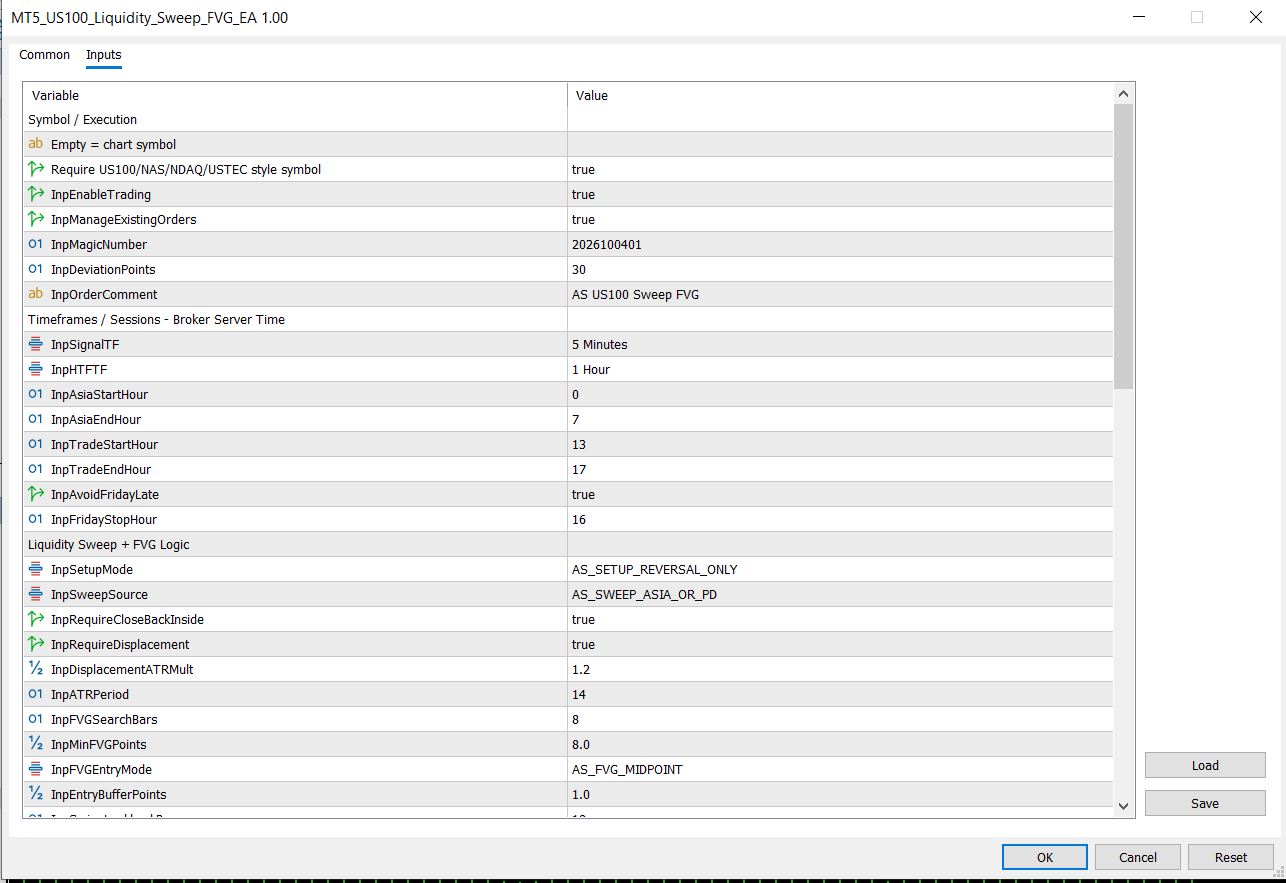
Figure 1: The EA's Inputs tab with the default (safe) chart preset. Aggressive M5/M15 presets ship in the download.
Package Contents
| File | Type | Purpose |
|---|---|---|
| MT5_US100_Liquidity_Sweep_FVG_EA.ex5 | Expert Advisor | Compiled MT5 robot — install into MQL5/Experts. |
| MT5_US100_SweepFVG_Aggressive_M5.set | Input preset | Faster M5 research preset — load from the Inputs tab. |
| MT5_US100_SweepFVG_Aggressive_M15.set | Input preset | Slower M15 research preset with H1 EMA bias. |
| MT5_US100_SweepFVG_Aggressive_M5.ini | Tester config | Strategy Tester setup for the M5 preset (USTECm, 2026 range, $1,000, 1:500). |
| MT5_US100_SweepFVG_Aggressive_M15.ini | Tester config | Strategy Tester setup for the M15 preset. |
Installation in 4 Steps
- Copy the .ex5 into MQL5 > Experts in your MT5 data folder and refresh the Navigator.
- Attach the EA to your broker's US100 / NAS100 / USTEC chart and enable Algo Trading.
- Load either .set preset from the Inputs > Load button (or keep the safer chart defaults).
- Run the included .ini in the Strategy Tester first (View > Strategy Tester > load settings), then forward-test on demo.
FAQ
Is this EA really free?
Yes. The compiled .ex5 and both presets are free to download with no registration. Source code (MQ5) is not included and is available only through the source-code packages.
Does it work on NAS100 and USTEC?
Yes. The symbol guard accepts US100, NAS, NDAQ, USTEC and NDX naming. Always confirm your broker's exact symbol name, spread and tick value before live use.
Is it a grid or martingale robot?
No. It trades one pending limit order per setup with a fixed stop and a 2R+ target. There is no lot multiplication and no averaging down.
Which timeframe should I run it on?
Attach it to any chart — the EA works on its own signal timeframe internally (M5 default, M15 preset available). The chart timeframe itself does not affect the logic.
Can it pass a prop firm challenge?
The default preset is deliberately cautious (0.5% risk, 2 trades/day, 2% daily loss cap, 5% drawdown cap, Friday-late guard), which suits prop rule sets, but no EA can guarantee a challenge outcome. Verify every rule of your specific firm and test on demo first.
Related Free Tools
Disclaimer: educational trading software. Not investment advice, no profit guarantee. Spread, slippage, commission, swap, broker symbol specs and server time can change outcomes. Test on demo first. See full disclaimer.





