US100 Liquidity Sweep FVG EA MT5 Free Download (NAS100 / USTEC)
A session-based Nasdaq Expert Advisor that waits for a liquidity sweep of the Asia range or the previous day high/low, confirms displacement and a fair value gap, then rests a pending limit order inside the gap. Entry, stop and target are computed before execution, and every trade passes a built-in pre-trade guard, daily loss guard, drawdown guard and spread filter.
What This US100 Expert Advisor Does
The MT5 US100 Liquidity Sweep FVG EA is a pending-limit index robot built around the Smart Money / ICT concept of liquidity sweep followed by fair value gap continuation or reversal. Instead of chasing breakouts with market orders, the EA maps the liquidity pools that form before the US cash session — the Asia session range and the previous day high and low (PDH/PDL) — detects when price sweeps those pools, then waits for a displacement impulse to leave a three-candle fair value gap (FVG). A pending buy limit or sell limit is placed inside that gap, with stop loss, take profit and lot size calculated in advance.
The EA does not use grid, martingale or averaging. One setup produces one pending order with a predefined stop and a reward-to-risk target. Weak setups are rejected before execution and the reason is printed to the Journal through a pass/fail decision checklist.
Why US100 (Nasdaq) Suits a Sweep + FVG Model
US100 — known as NAS100, NDX, USTEC or NDX100 depending on the broker — is a cash-session index. Most of its daily range is created during the New York cash session, and the levels that form before the open (the Asia range on index CFDs and the previous cash day high/low) act as obvious resting-liquidity references. Stop clusters accumulate above and below those levels, which is why sweep-then-reverse and sweep-then-continue behaviour is common around the US open.
| Structural Level | Why It Matters | Default Window (Server Time) |
|---|---|---|
| Asia session range (high/low) | Overnight consolidation builds a clean liquidity pool on both sides. A sweep during the US session often marks the failed side of the range. | 00:00 - 07:00 |
| Previous day high (PDH) | Classic buy-side liquidity. Runs above PDH frequently exhaust into reversal or continuation displacement. | Calculated from the prior calendar day |
| Previous day low (PDL) | Classic sell-side liquidity. A held sweep below PDL followed by a bullish FVG is the primary long scenario. | Calculated from the prior calendar day |
| Trade session (default) | Entries are only considered during the high-participation window that overlaps the US cash open on most brokers. | 13:00 - 17:00 |
Because the model is time-boxed, it naturally avoids low-liquidity hours. The optional Friday-late guard stops new setups from 16:00 server time on Fridays, which matters on prop-firm accounts where weekend holding and late-Friday fills can breach rules. If you trade a US-focused prop firm or a challenge account, pair this EA with the MT5 daily drawdown limiter calculator to stress-test the guard values before you change them.
The Four-Stage Setup, Step by Step
Every trade follows the same deterministic pipeline. The EA evaluates it once per closed signal-timeframe candle — default M5 — so signals are formed on closed data, not mid-candle noise.
Scanning the last bars inside the trade window, the EA flags a sweep when a candle wicks beyond the Asia high, Asia low, PDH or PDL. With close-back-inside enabled (default), the same candle must also close back within the level — the classic stop-run rejection, not a genuine breakout close.
After the sweep, the EA searches the following bars for a three-candle FVG: for a bullish gap, the gap is the space between candle 1's low and candle 3's high with the middle candle closing strongly higher. The middle candle must move at least 1.2 x ATR(14) (default) and the gap must meet the minimum size in points (8.0 by default).
In the default reversal mode, a sweep of highs looks for a bearish FVG (short) and a sweep of lows looks for a bullish FVG (long). The continuation mode mirrors this — sweep of highs looks for a bullish FVG. Direction, entry price, stop and target are all fixed before the order is sent.
A buy limit is placed inside the FVG only if it sits below the current ask; a sell limit only if it sits above the bid. The order carries the calculated SL and TP, expires after 180 minutes by default, and is cancelled automatically when a newer opposite setup appears.
Fair value gap anatomy used by the EA
A fair value gap is an imbalance left behind when price displaces so fast that one side of the order book is not fully traded. In the raw three-candle form the EA uses:
- Bullish FVG: gap between the low of candle 1 and the high of candle 3 — entry candidates are the near edge, midpoint (default) or deep edge.
- Bearish FVG: gap between the high of candle 1 and the low of candle 3 — the same three entry modes apply inverted.
- Displacement: the middle candle's body must exceed the ATR multiplier, which separates impulsive gaps from thin, low-conviction gaps.
- Minimum size: gap must exceed the points threshold, so the entry has enough room for the stop buffer without violating broker stop distance.
| Entry Mode | Order Price | Behaviour |
|---|---|---|
| AS_FVG_MIDPOINT (default) | 50% of the gap | Balanced fill probability and risk. The stop usually sits beyond the sweep extreme, so a full gap fill is still a valid trade. |
| AS_FVG_NEAR_EDGE | Close edge of the gap + buffer | Higher fill rate, smaller reward because the stop distance is larger relative to entry. |
| AS_FVG_DEEP_EDGE | Far edge of the gap + buffer | Best price, lowest fill probability. Suits traders who only want deep retracements. |
Stop Loss, Target and Higher-Timeframe Bias
The default stop mode places the stop beyond the sweep extreme that triggered the setup, then blends it with the swing structure of the last 18 signal bars, so the stop always clears both the liquidity wick and the recent swing:
| Stop Mode | Default Buffer | Logic |
|---|---|---|
| AS_SL_SWEEP_EXTREME (default) | 10 points | Stop beyond the sweep candle's extreme. Slack layers over swing high/low of the lookback window. |
| AS_SL_FVG_PLUS_ATR | 1.25 x ATR | Stop beyond the far FVG edge plus an ATR multiple. Adaptive to volatility; useful on M15. |
| AS_SL_FIXED_POINTS | 80 points | Fixed distance from entry. Predictable but ignores structure; test against your broker's US100 tick value. |
Take profit is always derived from risk: TP = entry ± (risk x InpRewardRisk). The default 2.0R target with a 1.5R minimum filter means any setup whose structure cannot deliver at least 1.5R is discarded. The higher-timeframe bias filter (default: H1 close vs EMA50) can additionally block counter-trend entries — a bearish FVG is only taken when H1 price is at or below the EMA, and vice versa. Bias modes available: off, H1 EMA, daily open, or both.
Optionally, once the position reaches +1R the stop is moved to breakeven plus a small offset (2 points by default). Partial close is disabled by default but can be enabled to bank 50% of the position at +1.5R.
Built-In Protection Stack (Why It Is Not a Reckless Index Robot)
Before any order is sent, the EA runs a gate checklist. If any gate fails, the setup is skipped and the reason is printed to the Journal (or the Strategy Tester log). The checklist has pass/fail entries for session window, spread, history, live tick, liquidity map, ATR, sweep, FVG, bias, open positions, pending orders, trades today, loss streak, daily loss and drawdown.
| Guardrail | Default Input | Default Value | Purpose |
|---|---|---|---|
| Spread filter | InpMaxSpreadPoints | 80 points (filter ON) | Blocks entries when the broker spread widens — critical on index CFDs around the open. |
| Positions cap | InpMaxSymbolPositions | 1 | One live position per symbol and magic number. |
| Pending cap | InpMaxSymbolPendingOrders | 1 | One resting limit at a time; opposite pendings are cancelled on a new setup. |
| Trades per day | InpMaxTradesPerDay | 2 | Anti-overtrading cap. |
| Consecutive losses | InpMaxConsecutiveLosses | 2 | Stops trading after a losing streak. |
| Daily loss guard | InpMaxDailyLossPercent | 2.0% | Halts new trades after the day's realized loss limit. |
| Drawdown guard | InpMaxDrawdownPercent | 5.0% | Halts new trades when equity drawdown from balance exceeds the cap. |
| Free margin guard | InpMinFreeMarginPercent | 150% | Stops new risk when free margin relative to used margin is too thin. |
| Broker stops check | InpRejectIfStopsInvalid | true | Rejects setups that violate the broker's stop/freeze distance or SL/TP geometry. |
| Pending expiry | InpPendingExpiryMinutes | 180 minutes | Unfilled limits are removed, so stale gaps are not left lying around. |
Lot sizing is broker-aware: in equity-percent mode (default 0.5%) the EA uses OrderCalcProfit on the broker's minimum lot to measure the cash loss over the entry-to-stop distance, then scales the volume to the exact risk budget, normalizes it to the broker's lot step and clamps it to InpMaxLotPerTrade (10.0). A fixed-lot mode is also available. If the calculated lot is below the broker minimum, the trade is skipped rather than rounded up.
Input Parameters (Default Chart Preset)
The screenshot below is the live Inputs tab of the compiled EA with the default preset loaded. Every group is documented after it.
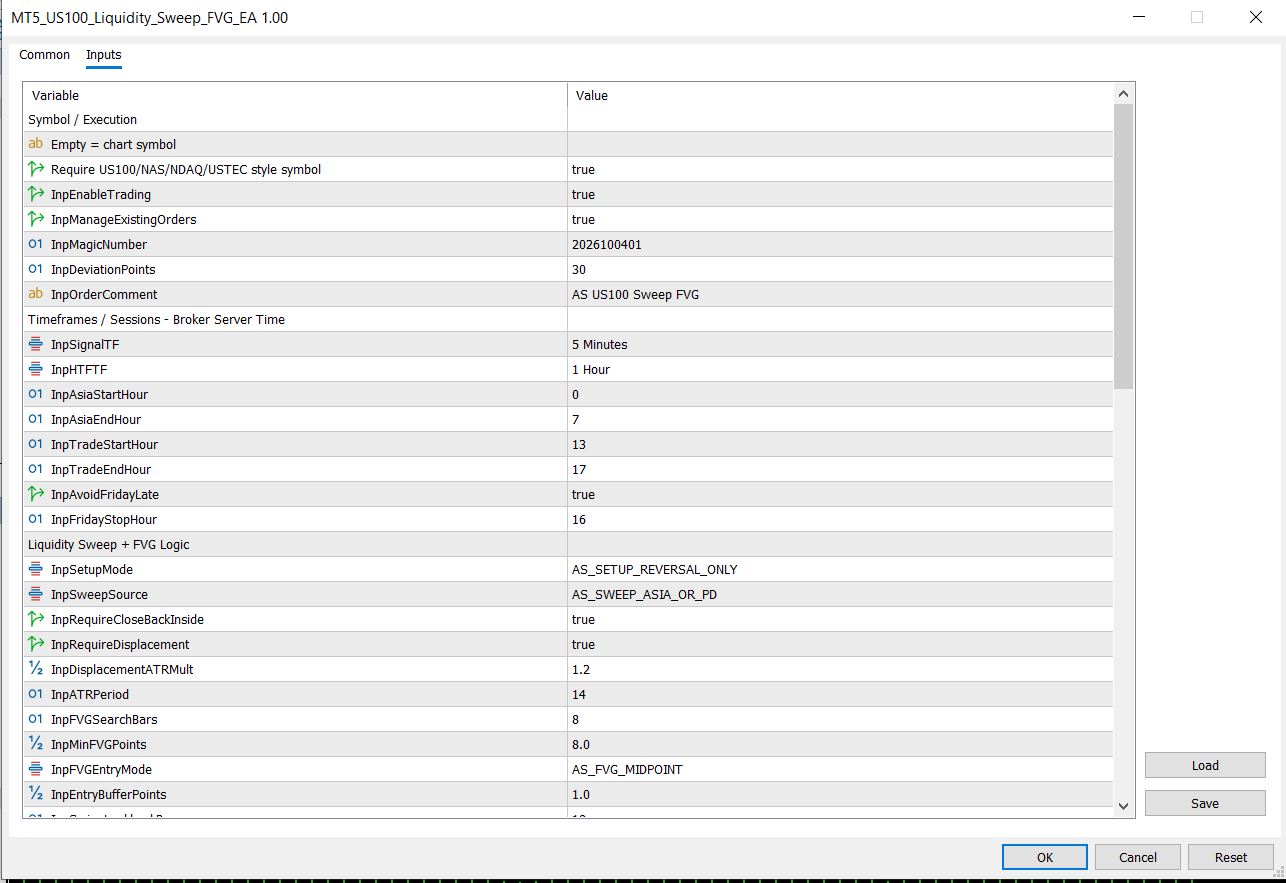
Figure 1: MT5 Inputs tab of the US100 Liquidity Sweep FVG EA (default configuration).
| Input | Default | Meaning |
|---|---|---|
| InpTradeSymbol | (empty) | Empty trades the chart symbol. Set it only if you want a fixed symbol across charts. |
| InpRequireNasdaqSymbol | true | Refuses to start unless the symbol name contains US100, NAS, NDAQ, USTEC or NDX — protects against attaching to the wrong chart. |
| InpMagicNumber | 2026100401 | Unique ID for positions, pendings and history filters. Change per chart. |
| InpDeviationPoints | 30 | Maximum slippage allowance on execution. |
| InpSignalTF / InpHTFTF | M5 / H1 | Signal timeframe and higher-timeframe bias timeframe. |
| InpAsiaStartHour / InpAsiaEndHour | 0 / 7 | Window (server time) used to build the Asia range liquidity map. |
| InpTradeStartHour / InpTradeEndHour | 13 / 17 | Window (server time) when sweeps are eligible and orders may be placed. |
| InpAvoidFridayLate / InpFridayStopHour | true / 16 | Blocks new setups from 16:00 server time on Fridays. |
| InpSetupMode | AS_SETUP_REVERSAL_ONLY | Reversal (default), continuation, or auto. |
| InpSweepSource | AS_SWEEP_ASIA_OR_PD | Asia range only, previous day only, or either (default). |
| InpRequireCloseBackInside | true | Requires the sweep candle to close back inside the swept level. |
| InpRequireDisplacement / InpDisplacementATRMult | true / 1.20 | Minimum impulse size for the FVG leg, in ATR units (ATR period 14). |
| InpFVGSearchBars | 8 | How many signal bars after the sweep are scanned for a gap. |
| InpMinFVGPoints | 8.0 | Minimum gap size in broker points. |
| InpFVGEntryMode / InpEntryBufferPoints | MIDPOINT / 1.0 | Where inside the gap the limit order rests, plus a small offset. |
| InpSwingLookbackBars | 18 | Swing window used to firm up the stop beyond structure. |
| InpStopMode + buffers | SWEEP_EXTREME / 10.0 | Sweep extreme (default), FVG + ATR (1.25), or fixed points (80). |
| InpRewardRisk / InpMinimumRewardRisk | 2.0 / 1.5 | Target as R multiple, and the minimum acceptable R:R for any setup. |
| InpUseHTFBiasFilter / InpBiasFilter | true / EMA_HTF | H1 EMA(50) close bias, daily open, both, or off. |
| InpRiskMode / InpRiskPercent / InpFixedLot | EQUITY_PERCENT / 0.5 / 0.10 | Risk engine. Percent mode sizes from equity; fixed mode uses the fixed lot. |
| InpMaxLotPerTrade | 10.0 | Absolute lot ceiling regardless of risk calculation. |
| InpMoveSLToBE / InpBETriggerR / InpBEOffsetPoints | true / 1.0 / 2.0 | Breakeven stop once the trade reaches +1R. |
| InpUsePartialClose / AtR / Percent | false / 1.5 / 50 | Optional partial exit at +1.5R. |
| InpShowPanel / InpDrawLevels / InpPrintLogs | true | On-chart status panel, entry/SL/TP/FVG lines, and Journal logging. |
| InpPrintDecisionChecklist / InpChecklistOnlyWhenBlocked | true / true | Prints the full pass/fail checklist when a setup is blocked. |
Included Presets: M5 Aggressive vs M15 Aggressive
The download zip ships two ready-made .set presets and two matching Strategy Tester .ini files. The M5 preset is the default chart configuration above with a wider trading window and faster FVG parameters. The M15 preset uses slower structure, a larger gap threshold and keeps the H1 EMA bias switched on.
| Setting | M5 Aggressive | M15 Aggressive |
|---|---|---|
| Signal timeframe / HTF | M5 / H1 | M15 / H1 |
| Trade window (server time) | 01:00 - 23:00 | 01:00 - 23:00 |
| Friday-late guard | Off (stop hour 22) | Off (stop hour 22) |
| Displacement multiplier | 0.80 x ATR | 1.00 x ATR |
| FVG search bars / min gap | 12 / 5.0 pts | 10 / 10.0 pts |
| Entry mode / buffer | Midpoint / 1.0 pt | Midpoint / 2.0 pts |
| Stop mode / buffer | Sweep extreme / 12 pts | Sweep extreme / 18 pts |
| Reward:Risk / minimum | 2.20 / 1.20 | 2.50 / 1.30 |
| HTF bias | Off | H1 EMA(50) |
| Risk per trade | 1.0% equity | 1.0% equity |
| Trades per day / loss streak cap | 8 / 5 | 6 / 5 |
| Daily loss / max drawdown guard | 10% / 30% | 10% / 30% |
| Pending expiry | 240 minutes | 300 minutes |
| Breakeven trigger / offset | 1.0R / +5 pts | 1.0R / +8 pts |
| Partial close | 50% at 1.5R | 50% at 1.5R |
| Magic number | 2026100405 | 2026100415 |
Aggressive means wider testing envelopes, not guaranteed profit. The aggressive presets deliberately relax the session filter and daily guards so more setups appear during research. For live trading, start from the default chart preset (2 trades/day, 0.5% risk, 2% daily loss, 5% drawdown) and only widen limits after you verify behaviour on your broker's US100 symbol. Never copy an aggressive tester preset onto a funded account without testing.
What the .set and .ini files actually are
- .set — an MT5 input preset. Load it from the EA's Inputs tab with the Load button, then review every value against your account size.
- .ini — an MT5 Strategy Tester configuration. It contains the tester section (expert, symbol, period, date range, deposit, leverage, modeling) plus every input value, so you can reproduce the exact backtest run.
How to Install the EA and Load a Preset
- Open MetaTrader 5 and go to File > Open Data Folder > MQL5 > Experts.
- Copy MT5_US100_Liquidity_Sweep_FVG_EA.ex5 into that folder.
- Restart MT5 or right-click the Navigator > Expert Advisors panel and choose Refresh.
- Drag the EA onto a US100 / NAS100 / USTEC chart (any timeframe — the EA trades its own signal timeframe internally).
- In the EA Inputs tab, click Load and choose either aggressive preset, or keep the safer chart defaults.
- Confirm the symbol guard message in the Journal shows your symbol, enable Algo Trading, and let the status panel print "Ready".
- Test on demo first, then run the Strategy Tester using the included .ini files before risking live capital.
How to Run the Included Strategy Tester .INI
- Open View > Strategy Tester in MT5.
- Select MT5_US100_Liquidity_Sweep_FVG_EA as the Expert and your broker's US100 symbol (the .ini files reference USTECm — change it to your symbol name).
- Right-click the tester settings area (or use the Load option) and load MT5_US100_SweepFVG_Aggressive_M5.ini or the M15 variant. The tester configuration included uses a $1,000 deposit, 1:500 leverage and a 2026.01.01 - 2026.10.01 date range.
- Use an every-tick model for the most realistic fills (the .ini ships with Model=0). Index CFDs are spread-heavy — also compare "Every tick based on real ticks" if your broker provides it.
- Run the test, then read the report with our guide: How to read an MT5 Strategy Tester report.
- When you are satisfied, save the tester settings and review the pass/fail checklist lines in the Journal tab of the tester for every blocked setup.
The .ini and .set files are starting points for your own research. Backtest quality depends on your broker's history, spread model, commissions and swap. The included files do not constitute a performance claim.
Free Download — Complete EA Pack
One zip contains the compiled Expert Advisor, both aggressive presets and both Strategy Tester configurations. No registration required. The MQL5 source code is not included in the free download — only the compiled .ex5 binary.
MT5_US100_Liquidity_Sweep_FVG_EA.ex5
MT5_US100_SweepFVG_Aggressive_M5.set
MT5_US100_SweepFVG_Aggressive_M15.set
MT5_US100_SweepFVG_Aggressive_M5.ini
MT5_US100_SweepFVG_Aggressive_M15.ini
Install into MQL5/Experts (EA) and load presets from the Inputs tab.Frequently Asked Questions
What exactly is the US100 Liquidity Sweep FVG EA?
It is a free MetaTrader 5 Expert Advisor for the Nasdaq (US100/NAS100/USTEC) that detects liquidity sweeps of the Asia session range or the previous day high/low, confirms a displacement-filtered fair value gap, and enters with a pending buy/sell limit order carrying a predefined stop loss and reward-to-risk target.
Which symbols does the EA support?
Any broker symbol whose name contains US100, NAS, NDAQ, USTEC or NDX — this includes US100, NAS100, USTEC, USTECm, NDX100 and similar. The symbol guard can be disabled if your broker uses a different naming convention, but the strategy is designed for Nasdaq index CFDs.
Is the MQL5 source code included?
No. The free download contains the compiled .ex5 Expert Advisor, two .set presets and two Strategy Tester .ini files. Source-code licensing is available separately through our source-code packages if you need to modify the logic.
Does the EA use grid or martingale?
No. Each setup produces a single pending limit order with a fixed stop loss and take profit. There is no averaging, no grid expansion and no lot multiplication after losses. The only optional scaling tool is a partial close at +1.5R, which reduces size rather than increasing it.
What is the difference between the M5 and M15 presets?
The M5 preset scans faster setups with a 0.80 ATR displacement filter, 5-point minimum gap and 2.2R target with no higher-timeframe bias. The M15 preset requires a 1.00 ATR displacement, a 10-point minimum gap, a 2.5R target and keeps the H1 EMA(50) bias filter active. Both are "aggressive" test envelopes — start with the chart defaults for live trading.
Why does the EA use pending limit orders instead of market entries?
The fair value gap is a retracement zone. A pending limit lets the EA enter at a planned price inside the imbalance instead of chasing the displacement candle. If price never returns to the gap, the order simply expires after the configured minutes (180 by default) and the setup is skipped.
Can I use it on a prop firm challenge?
The default chart preset is built with prop-firm caution in mind: 0.5% risk, maximum 2 trades per day, consecutive-loss guard, 2% daily loss guard, 5% drawdown guard and a Friday-late filter. Always verify the EA against your specific firm's rules (news trading, minimum trading days, weekend holding) before use, and read our prop firm EA rules guide.
What information does the on-chart panel and checklist show?
The panel shows the EA's current status — Ready, waiting reason, or the last placed order. The decision checklist prints pass/fail values for every gate: session, spread, history, tick, liquidity map, ATR, sweep, FVG, bias, positions, pendings, trades today, loss streak, daily loss and drawdown. It makes every decision auditable.
How much capital do I need to run it?
The included tester .ini files use a $1,000 starting deposit for research. In equity-percent mode lot sizing scales with your balance, but you need enough capital for the broker's minimum lot on US100 plus margin for drawdown. A $1,000+ account with 1:100 leverage or better is a practical starting point for testing; demo first.
Does the EA trade during news?
It does not have a calendar news filter. Instead it relies on the session window, spread filter and the optional Friday guard. Around CPI, FOMC and NFP the spread on US100 typically widens well past the default 80-point cap, which blocks entries automatically until conditions normalize.
Keep Reading
Want This Logic Customized for Your Account?
Sessions, sweep sources, entry modes, risk caps and broker symbol rules can all be adapted to a custom MT5 Expert Advisor or prop-firm challenge. Tell us your rules and we will scope the build.
Request a Custom EA QuoteRisk disclaimer: this EA and its presets are provided as educational trading software, not investment advice and not a promise of profit. Backtests and presets can differ from live results because of spread, slippage, commission, swap, broker symbol specifications, server time and execution speed. Test on a demo account, verify the symbol, and never risk money you cannot afford to lose. See our disclaimer.





