Free MT5 D1 Weekday Pip Movement Forecast Indicator
PipsPredict is a MetaTrader 5 daily forecast dashboard that studies historical D1 candles, weekday pip behavior, ATR regime, weekly trend, monthly volatility and nearest similar cases to project the next D1 high, low, close and directional bias.
Compiled EX5 only. MQ5 source code is not included in this free download.
Important Trading Notice
PipsPredict is a statistical forecasting and decision-support indicator. It does not guarantee future price movement, profit, win rate, or trading results. Daily candles can change because of news, spread widening, liquidity gaps, broker feed differences, geopolitical events and execution conditions. Always test on demo first.
What PipsPredict Does
Most MT5 indicators show an arrow and hide the reason. PipsPredict shows the reasoning dashboard: how each weekday has behaved historically, how much price usually moves from the daily open, whether similar D1 contexts favored buy or sell pressure, where the projected high/low/close zones are, and whether the setup is SAFE, SMALL, CONFIRM or WAIT.
Counts historical Monday-Friday behavior, bull percentage, average range, body, close from open, upside/downside movement and next-day gap.
Matches the current D1 context against nearest historical cases using range, body, ATR, close position, trend and volatility similarity.
Draws predicted D1 high, low and close levels directly on the chart as practical zones, not only text.
Scans majors, minors, crosses and gold symbols with broker suffix detection for names like EURUSDm or XAUUSDm.
Complete Engine Workflow
| Step | What Happens Inside the Indicator | Why It Matters |
|---|---|---|
| 1. Read D1 History | Loads completed D1 candles from MT5 using the selected symbol and default 500-day history. | Builds a real symbol-specific dataset instead of using fixed generic values. |
| 2. Normalize Weekday | Applies GMT offset and optional midday anchoring to classify each candle as Monday, Tuesday, Wednesday, Thursday or Friday. | Daily candles are broker-time dependent; offset control prevents wrong weekday statistics. |
| 3. Build Weekday Stats | Calculates cases, bull ratio, average range, body, close from open, up/down from open and next-day gap. | Shows whether a symbol has weekday behavior such as Friday weakness or Monday carry. |
| 4. Build Live Context | Reads current bid/ask, current D1 open, live range, body, close position, ATR regime, weekly trend and monthly volatility. | Forecast uses current market state, not only historical averages. |
| 5. Find Nearest Cases | Scores older days by similarity distance and keeps the nearest cases. | Prevents comparing today with unrelated historical candles. |
| 6. Forecast Band | Combines weighted nearest cases, weekday movement, robust percentile movement and ATR minimum range. | Creates projected high, low and close zones instead of a single fragile number. |
| 7. Buy/Sell Chance | Weights historical cases by whether they closed above/below reference price and whether upside or downside room dominated. | Outputs probability-style directional bias from current price. |
| 8. Confidence and Risk | Builds confidence from sample quality, edge, distance, audit and risk score; penalizes stretched range, wide spread and Friday risk. | A strong-looking signal can be downgraded when current market risk is not clean. |
| 9. Safe Play Decision | Converts the result into SAFE, SMALL, CONFIRM or WAIT. | Encourages disciplined trading instead of chasing every forecast. |
How to Read the Dashboard
Number of completed D1 candles used for that weekday after filters.
Percentage of that weekday's candles that closed bullish from open to close.
Average D1 high-low range in pips for that weekday.
Average close movement from D1 open. Positive means average bullish close; negative means average bearish close.
Projected next daily close from the estimated next-day reference/open area.
Projected high-low forecast band. This is better than only predicting direction.
Checks the previous context-to-target forecast against current known D1 movement and reports direction/band quality.
Final safety classification using edge, audit, risk and confidence.
Screenshot: Input Parameters
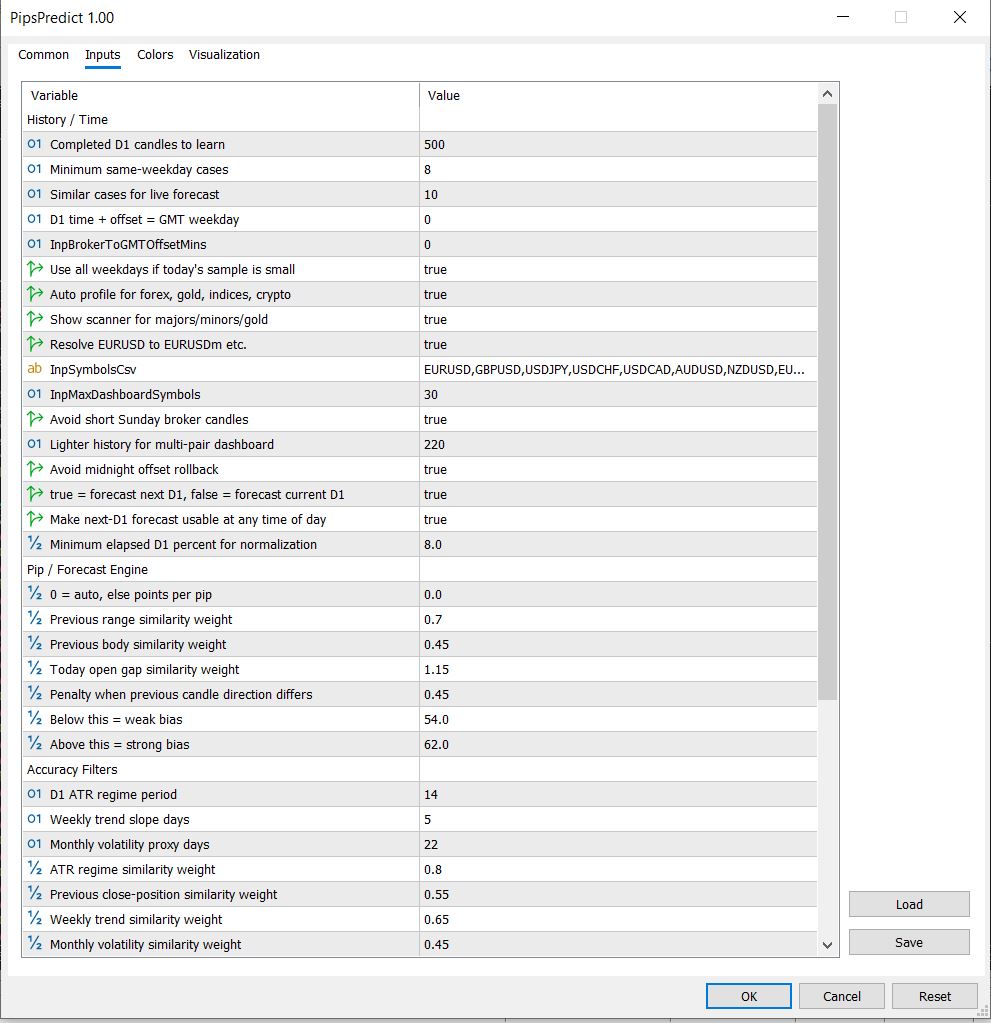
The default inputs are designed to work across normal forex pairs and gold. Advanced users can tune D1 history depth, nearest case count, GMT offset, symbols list, similarity weights, ATR regime period, forecast percentile and risk penalty.
Important Input Parameters Explained
| Input | Meaning | Practical Use |
|---|---|---|
| D1DaysToRead | Completed daily candles used for learning. | Default 500 balances enough history with recent market relevance. |
| MinimumWeekdaySamples | Minimum same-weekday cases before trusting weekday-specific stats. | Fallback can use all days if sample is too small. |
| NearestCases | Number of most similar historical cases used for forecast. | Smaller values are more selective; larger values are smoother. |
| ForecastNextD1 | Forecast next completed D1 candle instead of current D1. | Useful for planning tomorrow/next-day zones. |
| AutoSuffixDetection | Resolves symbols such as EURUSDm, XAUUSDm or .pro automatically. | Important for brokers that do not use plain symbol names. |
| Similarity Weights | Controls how much range, body, gap, ATR, close position, trend and volatility affect matching. | Advanced users can tune how strict the nearest-case engine is. |
| NewsRiskRangeATR | Flags when current daily range is already large relative to ATR. | Helps avoid late entries after a day has already expanded heavily. |
| OrderBufferPips | Buffer used when printing pending map levels. | Helps create Buy Limit, Sell Limit, Buy Stop and Sell Stop reference zones. |
Example From the XAUUSD Screenshot
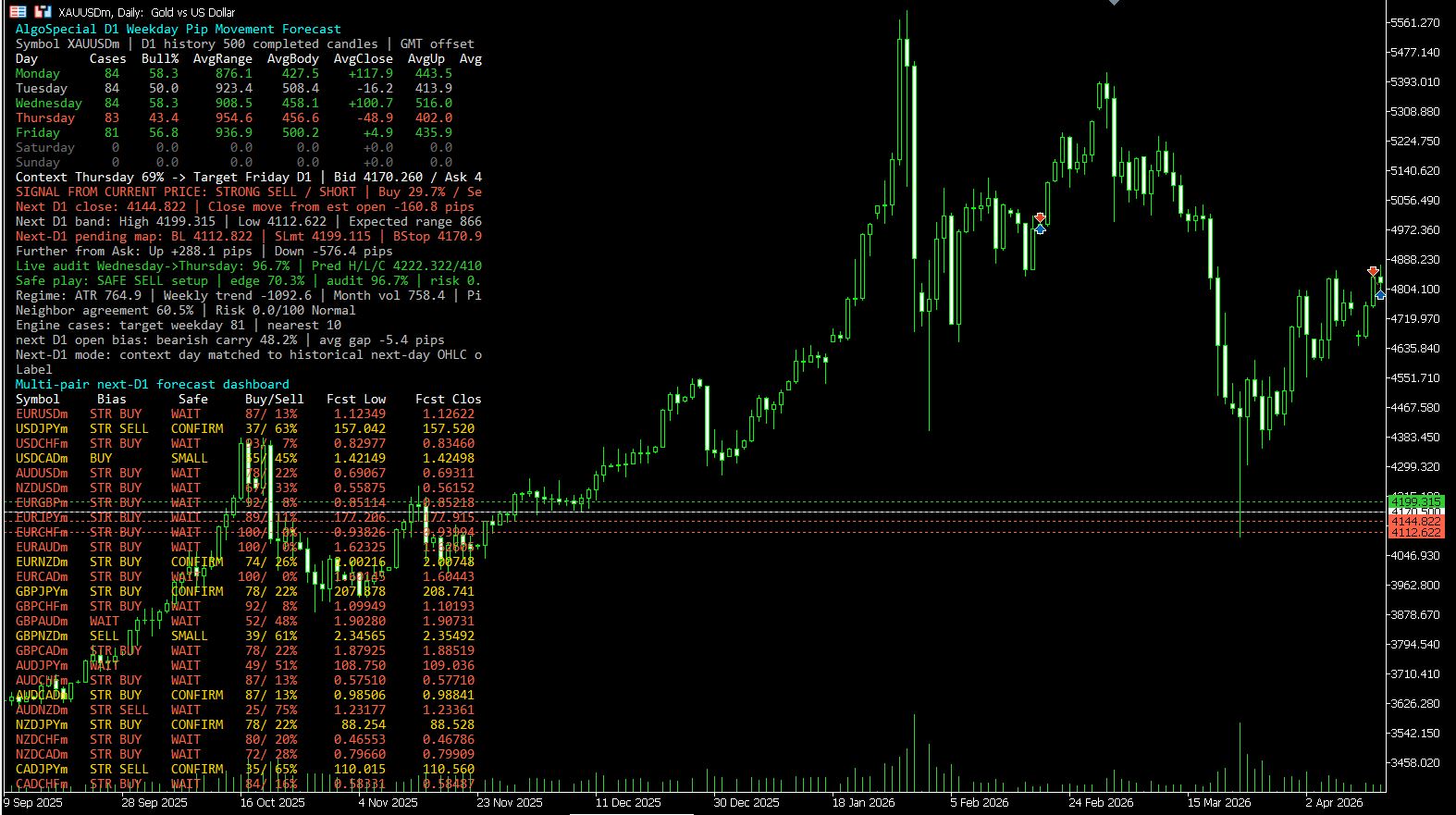
The screenshot shows the indicator on XAUUSDm D1. It reads the current context day, targets the next D1 candle, prints a sell-side bias, shows forecast high/low/close, prints pending-map levels, and reports safe-play status. The important point is that the indicator is not only saying “sell.” It also shows confidence, audit result, risk state, neighbor agreement and projected band.
Context Thursday 69% -> Target Friday D1
Signal from current price: STRONG SELL / SHORT
Buy 29.7% / Sell 70.3%
Next D1 close forecast
Next D1 high/low forecast band
Safe play: SAFE SELL setup
Risk: Normal
Installation
- Download PipsPredict.ex5.
- Open MetaTrader 5.
- Go to File > Open Data Folder.
- Open MQL5 > Indicators.
- Paste PipsPredict.ex5 into the Indicators folder.
- Restart MT5 or right-click Navigator and choose Refresh.
- Attach the indicator to a D1 chart or any chart where you want the D1 forecast dashboard visible.
Who Should Use This Indicator?
PipsPredict is best for traders who want D1 planning context before intraday execution. It can help you understand whether the next daily candle has a historical bullish or bearish tendency, where daily forecast zones may sit, and whether a setup is clean enough to wait for a trigger. It is especially useful for XAUUSD, major forex pairs and traders who prefer planned entries over emotional market chasing.
Limitations
- It uses broker D1 candles, so different broker server times can change weekday statistics.
- Historical similarity does not guarantee future movement.
- High-impact news, central bank events, war headlines, liquidity gaps and sudden spread widening can invalidate a forecast.
- The EX5 is a decision-support indicator, not an Expert Advisor. It does not open or close trades automatically.
- Projected high/low/close levels are statistical zones, not guaranteed targets.
FAQ
Yes. The compiled MT5 EX5 indicator is free to download from this page.
No arrow buffer is used. The dashboard updates forecast text and chart levels as live price changes. D1 forecasts are statistical and should be treated as planning context.
It can forecast XAUUSD daily pip movement zones using broker D1 history, but it cannot guarantee movement or profit.
The engine reads D1 data internally. You can attach it on a D1 chart for clean viewing, or on another timeframe if you want the dashboard visible while trading intraday.
Related Tools
Choose the next useful step
Most visitors arrive with one question: build, test, price, or trust. These shortcuts keep the path practical.
