Offline EA Builder for Windows: Build MT4 & MT5 Expert Advisors With No Internet
Web-based EA builders have one silent flaw: your strategy lives on someone else's server. A desktop EA builder keeps everything on your machine, works on a plane, and generates code you can verify. Here's what the free offline AlgoSpecial builder actually does — and the honest math behind why we verified it with 958 real compilations.
Table of Contents
1. Why Offline Beats Web-Based Builders
The web builder pitch is convenience. The hidden cost is exposure: your entry logic, indicator settings and risk parameters are transmitted to a server every time you click Generate. For a hobby trader that's theoretical. For a commercial strategy developer, a prop-firm trader with a real edge, or anyone selling EAs — it's unacceptable.
A desktop EA builder changes the equation:
| Aspect | Web Builder | Offline Desktop Builder |
|---|---|---|
| Strategy privacy | Params sent to server | Never leaves your PC |
| Internet dependency | Down server = no builder | Works on a plane |
| Account requirements | Often signup-walled | Zero accounts, zero telemetry |
| Code verification | Trust the vendor | One-click local compile in MetaEditor |
2. What the Builder Actually Generates
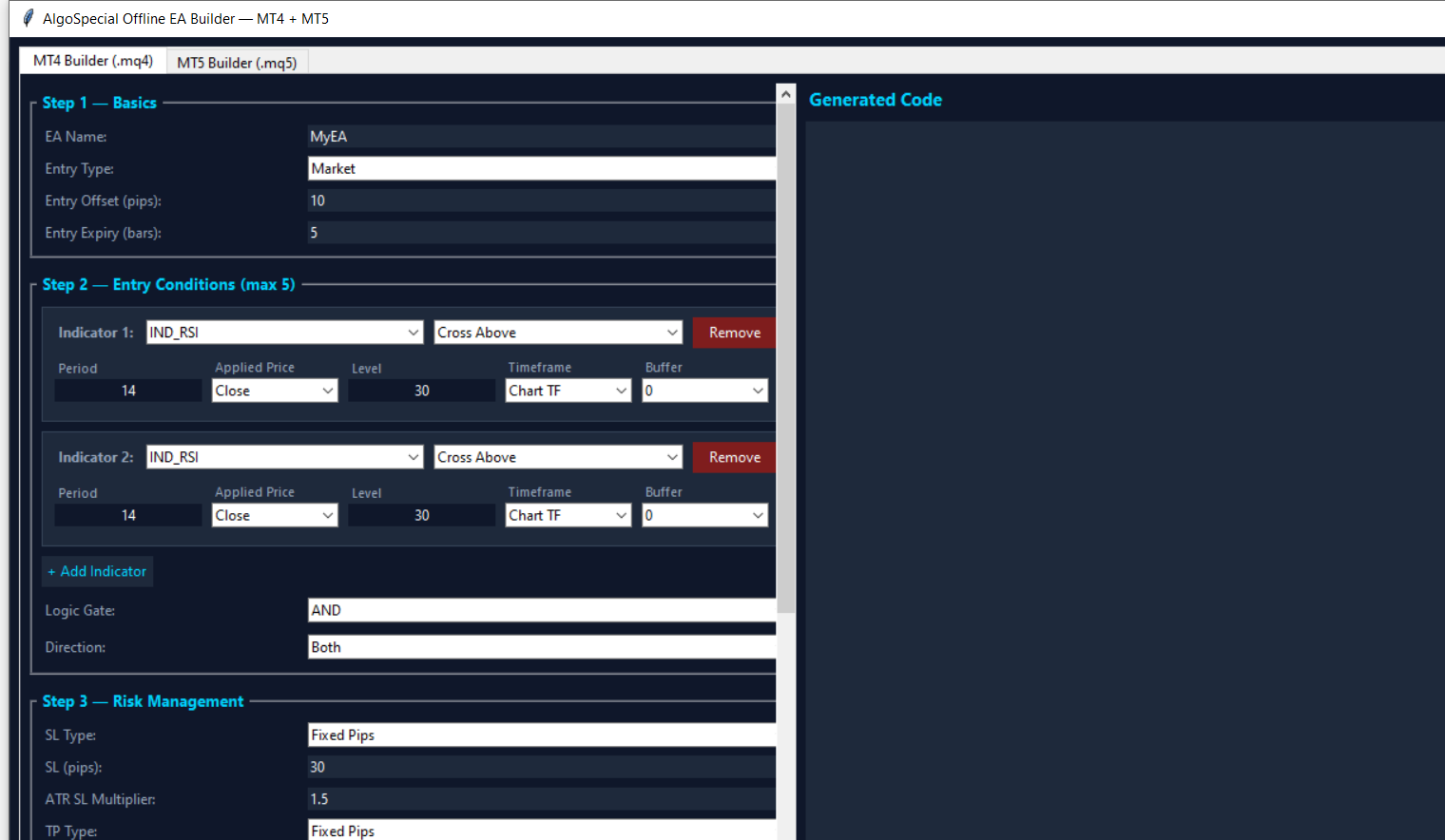
Not a toy code-snippet generator. The engine produces complete, compilable Expert Advisors with production structure:
| Layer | Generated In Every EA |
|---|---|
| Entry engine | Up to 5 indicators × 8 conditions, AND/OR logic, buy/sell/both, market/limit/stop entries, per-indicator timeframe |
| Risk engine | Fixed-pips or ATR stop loss, fixed or R:R targets, trailing stop with step logic, break-even lock-in |
| Sizing engine | Fixed lots or %-risk with tick-value math, broker min/max/step clamping, optional max-lot cap |
| Protection | Daily loss limit, max drawdown, consecutive-loss kill switch, spread/session/new-bar filters |
| Platform parity | MT4 uses OrderSend + MarketInfo; MT5 uses CTrade + indicator handles — each in its native idiom |
The MT5 side covers all 37 standard indicators — including the ones other builders skip: ADX Wilder, AMA, Chaikin, DEMA, FrAMA, TEMA, TRIX, VIDyA. MT4 gets its own honest set with the MQL4-only quirks handled (iVolume vs iVolumes, 3-arg iAD, and a real EMA³ TRIX implementation since MQL4 has no built-in TriX).
3. The 958-Compile Verification (And Why It Matters)
"The generated code compiles" is the most lied-about sentence in EA builder marketing. So we didn't assert it — we ran it. 958 automated compilations through real MetaEditor installations:
| Test | Scope | Result |
|---|---|---|
| MT5 cartesian sweep | 37 indicators × 8 conditions × buffers + option matrix + multi-indicator combos (479 files) | 0 errors, 0 warnings |
| MT4 cartesian sweep | Same matrix through the MT4 MetaEditor (479 files) | 0 errors, 0 warnings |
| Equivalence proof | Desktop engine vs web engine, identical params, byte-level diff | Byte-identical output |
That matrix caught real bugs during development — wrong parameter counts for AMA/DEMA/TEMA/VIDyA, the missing applied-volume parameter on AD/OBV/Volumes, the iTriX→iTriX naming trap — and every one was fixed before release. The build button in the desktop app runs the same verification locally: generate, then compile against your own MetaEditor, and see the compiler's verdict yourself.
4. Install & First EA in 60 Seconds
| Step 1 | Download the free EXE (9.2 MB, single file). If SmartScreen appears: More info → Run anyway (new unsigned app). |
| Step 2 | Open the app → pick the MT4 or MT5 tab → configure the six sections (Basics, Indicators, Risk, Money, Filters). |
| Step 3 | Click Generate Code → review the preview → Save as .mq4/.mq5 (or Compile with MetaEditor directly). |
| Step 4 | Copy the file into your MetaTrader data folder → MQL4/MQL5 → Experts → compile → attach. Backtest before live trading — always. |
5. Desktop vs Web: Which Should You Use?
Use the web builders for quick experiments on any device — MT4 and MT5 are free and instant. Use the desktop builder when the strategy matters: commercial development, prop-firm edges, anything you'd rather not describe to a server. Same engine, same verified output — the only difference is where the work happens.
FAQ
Is there a free offline EA builder for MT4 and MT5?
Yes — the AlgoSpecial offline builder is a free Windows desktop app covering both platforms in one tool: 37 MT5 indicators, 30 MT4 indicators, full risk management, no signup, no internet.
Is the generated code safe to run?
Every generator path passed 958 real MetaEditor compilations with zero errors and zero warnings. Still, always backtest on demo first — compilation guarantees correctness of code, not profitability of strategy.
Can I use it commercially to build EAs for clients?
Yes — the free EXE has no usage restrictions on the code it generates. If you want to embed the builder itself in your product, the $125 source-code license covers that.
What do I need besides the builder?
Only MetaTrader 4/5 installed to compile and run the generated EAs. The builder itself needs nothing else — no Python, no runtimes, no internet.





