XAUUSD Historical Dataset Free Download — M30 OHLC CSV + MT5 Export Scripts + Gold Forecast Engine
100,000+ M30 bars of clean gold price data, ready-to-use MQL5 export/append scripts, and a professional Python forecast engine with Elliott Wave detection, analog pattern matching, and walk-forward trade validation.
Free XAUUSD M30 Dataset — Download Now
6.29 MB CSV · 100,000+ bars · Timestamp, Open, High, Low, Close, Volume, Spread · Updated August 2026
Download XAUUSD M30 CSV (6.3 MB) Get MT5 Export ScriptsTable of Contents
The XAUUSD M30 Dataset — What's Inside
This is a clean, structured OHLCV dataset for XAUUSD (Gold vs US Dollar) on the M30 (30-minute) timeframe, exported directly from MetaTrader 5 History Center. It contains every M30 bar from the full available history — over 100,000 bars spanning multiple years — making it one of the most comprehensive free gold datasets available.
| Column | Description | Example |
|---|---|---|
| Timestamp | Date and time of bar close (YYYY.MM.DD HH:MM:SS) | 2026.08.05 15:30:00 |
| Open | Opening price of the 30-minute bar | 4257.318 |
| High | Highest price during the bar | 4259.348 |
| Low | Lowest price during the bar | 4254.455 |
| Close | Closing price of the bar | 4255.162 |
| TickVolume | Number of ticks during the bar | 1705 |
| Spread | Spread in points at bar close | 240 |
Pricing note: Gold is quoted in institutional format (e.g., 4257 = $4,257 per troy ounce). Divide by 100 for standard retail display if needed. The spread of 240 points = 2.4 in retail terms. This precision is ideal for machine learning — 3 decimal places preserve microstructure information that rounded retail data loses.
What You Can Do With This Data
- Python Machine Learning: Load with
pd.read_csv(file, parse_dates=['Timestamp']). Perfect for LSTM time series forecasting, XGBoost classification, Random Forest regression, and reinforcement learning environments. - MT5 Backtesting: Import into MT5 Strategy Tester for accurate gold EA backtesting. The M30 timeframe is the sweet spot — enough granularity for intraday patterns without the noise of lower timeframes.
- Volatility Analysis: Calculate ATR, Bollinger Band width, and session-based volatility patterns to optimize stop placement and position sizing for gold's unique behavior.
- Seasonality Research: Analyze day-of-week effects, session patterns, and monthly seasonality specific to gold — which behaves differently from currency pairs.
- Correlation Studies: Combine with DXY, EURUSD, and US 10-year yield data to build multi-asset models that capture gold's macro drivers.
MT5 OHLC Export & Append Scripts — Extract Your Own Data
These two free MQL5 scripts let you export any symbol and any timeframe from your MetaTrader 5 terminal directly to CSV. The export script pulls ALL available history. The append script adds only new bars without rewriting your file — perfect for maintaining an ever-growing dataset.
Script 1: OHLC_Export_Script.mq5 — Full Export
Pulls the complete history for the current chart's symbol and timeframe from MetaQuotes servers. Saves to MQL5\Files\[Symbol]_[TF]_OHLC.csv. Includes automatic download retry with timeout handling.
How to use: Place in MQL5\Scripts\. Press F7 in MetaEditor to compile (zero errors). Drag onto any MT5 chart. The script downloads the full history and exports it to CSV.
Script 2: OHLC_Append_Script.mq5 — Incremental Update
Reads your existing CSV file, counts the rows, and appends only the new bars from MT5. Never duplicates data. Never rewrites your file. Perfect for weekly dataset updates.
How to use: Place both the script and your existing XAUUSDm_PERIOD_M30_OHLC.csv in MQL5\Files\. Compile and run the script. It detects existing rows and appends only new bars.
How to Add Historical Data to MT5 — Three Methods
Method 1: MT5 History Center (Built-in, No Coding). Press F2 in MT5. Select your symbol and timeframe. Click Download — this pulls the full history from MetaQuotes servers. Click Export and choose CSV. The data is immediately loaded into MT5 for backtesting AND saved as a CSV file for external use. This is the fastest method for one-time exports.
Method 2: OHLC Export Script (Automated, Any Symbol). Place OHLC_Export_Script.mq5 in MQL5\Scripts\. Compile (F7 in MetaEditor). Drag onto any chart. The script automatically downloads the full history and exports to CSV in one click. Works on any symbol, any timeframe. Better than Method 1 for bulk exports across multiple pairs.
Method 3: OHLC Append Script (Incremental Updates). After you have your initial CSV from Method 1 or 2, place the CSV in MQL5\Files\. Run OHLC_Append_Script.mq5. It reads your existing file, counts the rows, and appends only new bars from the MT5 terminal. Run this weekly to keep your dataset current without re-exporting everything.
Where to find the exported files: After running any script, open MT5 → File → Open Data Folder → MQL5 → Files. Your CSV is there. The scripts use FileOpen() with FILE_COMMON, so the output goes to this standard location.
XAUUSD Forecast Engine — Professional Gold Prediction in Python
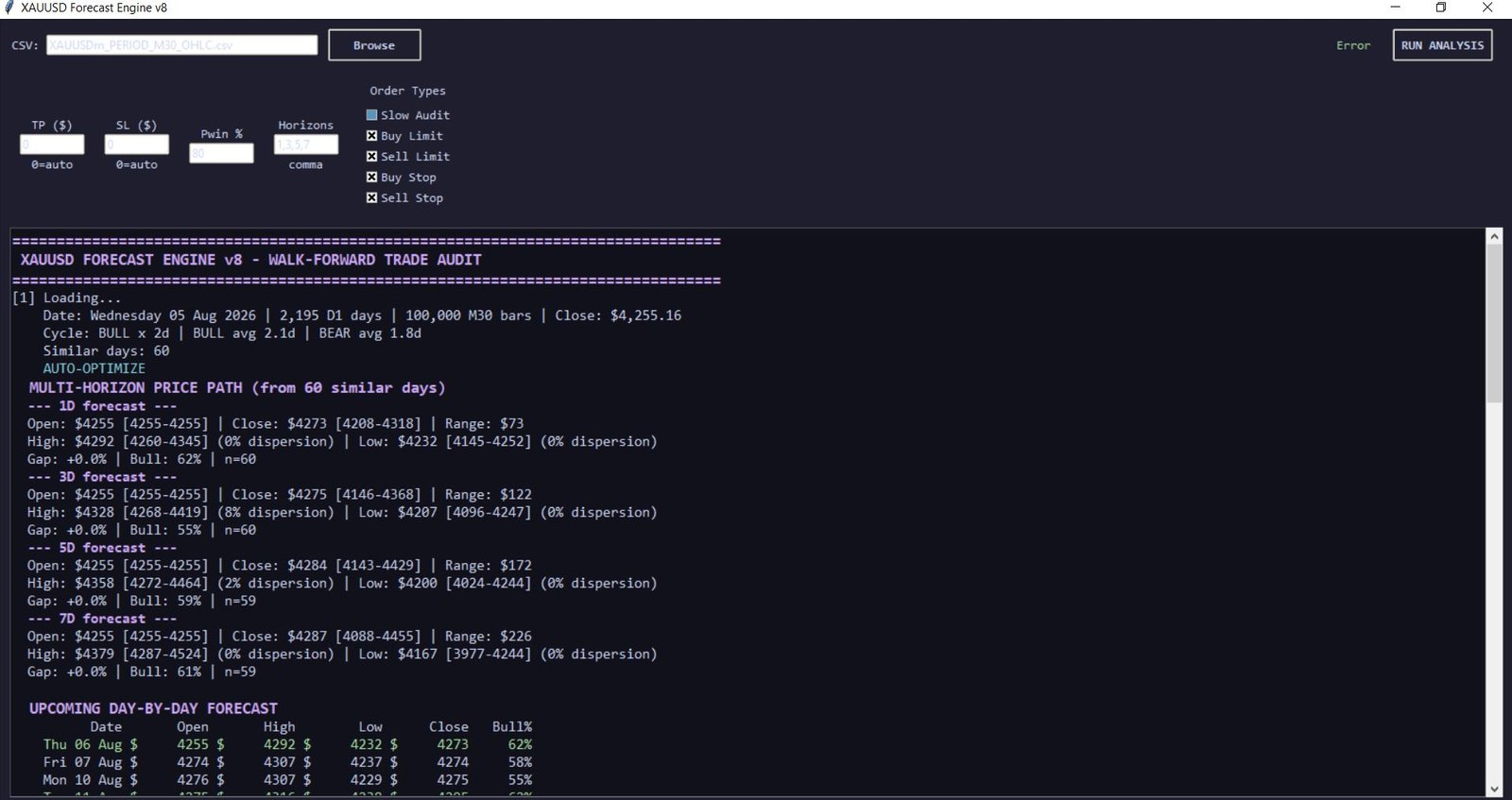
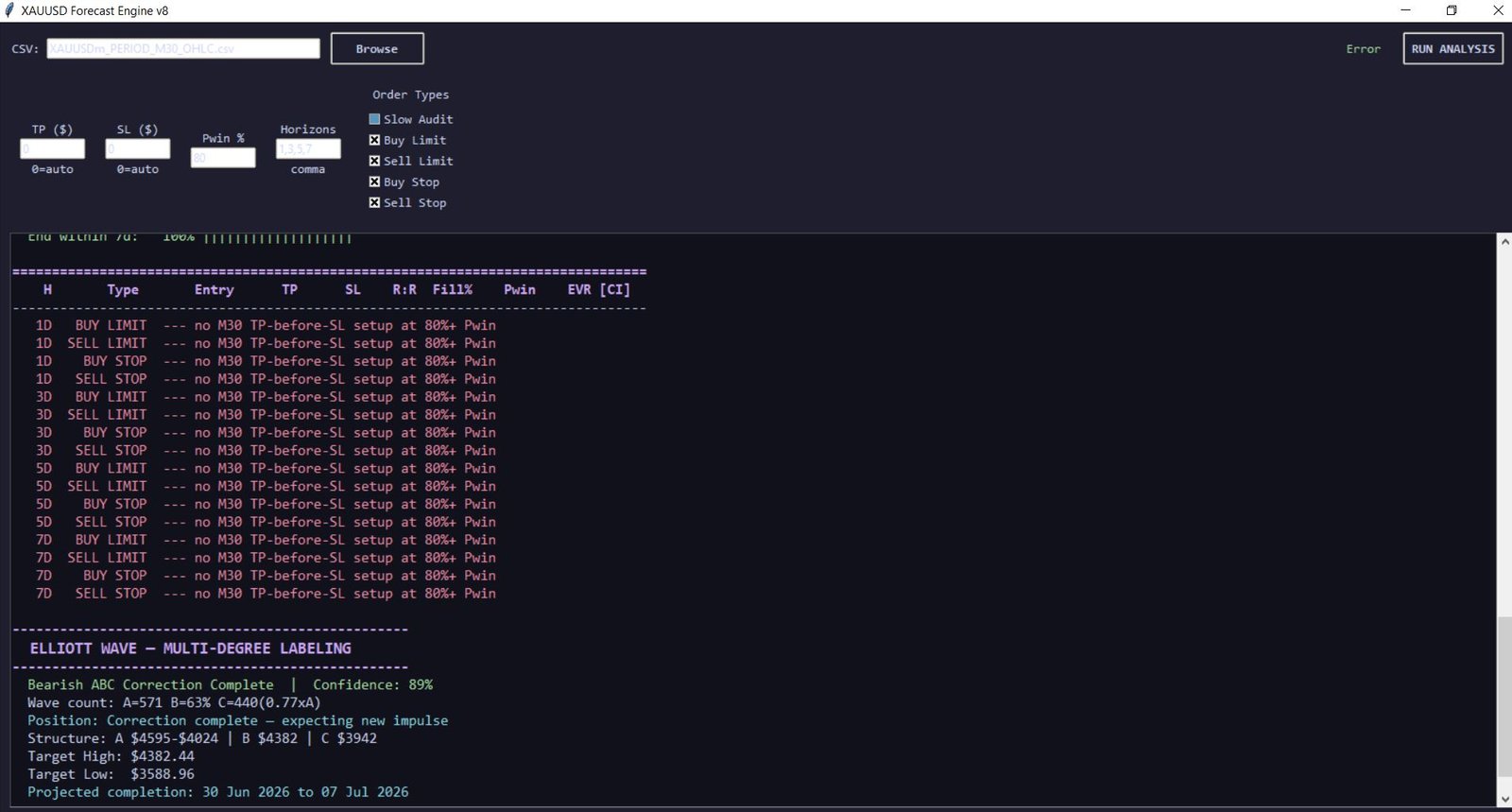
The XAUUSD Forecast Engine is a 1,282-line Python analytical suite that combines statistical rigor, machine learning, and classical technical analysis into a single runnable pipeline. It reads the M30 CSV dataset, builds daily bars, finds historically similar market conditions, projects forward price paths with confidence intervals, and validates every prediction with causal walk-forward auditing.
This is not a black box. The engine outputs every calculation, every confidence score, and every validation metric. You can inspect every step of the analysis. The GUI (built with tkinter) provides a clean interface for loading your CSV, configuring parameters, and viewing results.
Engine Features Breakdown
Wilson Confidence-Interval Analog Matching
Finds historically similar days using 13 engineered features — range, body percentage, returns, gaps, ATR ratio, and lagged values. Uses Mahalanobis distance with pseudo-inverse covariance for robust similarity scoring. Wilson score interval provides statistically sound confidence bounds — not just raw percentages.
Multi-Horizon OHLC Price Path Prediction
Projects forward price paths for 1, 3, 5, and 7-day horizons with percentile bands (P10, P50, P90). Shows median open/close, high/low excursions, range, bull probability, and dispersion metrics. Validated with M30 bar-by-bar path simulation — not just end-point comparisons.
Multi-Degree Elliott Wave Detection
Detects impulse (1-2-3-4-5) and correction (A-B-C) wave structures at three fractal degrees (2-bar, 5-bar, 10-bar margins). Validates with strict Elliott rules — W3 never the shortest, W2/W4 never retrace 100%, no W4-W1 overlap. Fibonacci scoring quantifies wave quality. Projects target prices and completion dates.
RSI Divergence & Level Probability Analysis
Detects bullish/bearish RSI divergences across swing points with divergence strength scoring. RSI Level Analysis tracks every RSI 22 cross of 80/75/25/20 and computes conditional probabilities of hitting the next level vs reversing within 30 days — showing you exactly what happened historically after each RSI extreme.
Reversal Pattern Scanner
Detects Shooting Star, Hammer, Marubozu, Doji, and Engulfing patterns with precise wick-to-body and range ratio calculations. Scores each pattern's reversal probability using a weighted ensemble of RSI divergence, cycle position, range climax, gap fill probability, swing proximity, and volume climax.
M30-Simulated Trade Setup Optimizer
Tests every TP/SL/entry offset/order type combination across all M30 analog paths. Simulates actual order execution — limit vs stop, fill/no-fill detection, intrabar TP/SL competition resolution. Outputs the single best setup ranked by expected value per unit of risk. No theoretical backtesting — actual M30 bar-by-bar path simulation.
Causal Walk-Forward Audit
The most important feature. Tests the engine directionally (is the forecast better than baseline?) and commercially (do the trade setups produce positive expectancy?). Every test date can only see older data — no look-ahead bias. Outputs Brier scores, accuracy by decile, fill rates, cost-adjusted expectancy, profit factor, and drawdown.
Day-by-Day Calendar Forecast
Projects next 7 trading days with full OHLC predictions and percentile bands. Each forecast day uses only the specific trading day offset from historical analogs — day 3 forecast only looks at what happened on day 3 after similar setups, not averaged across all horizons.
Cycle End Prediction
Uses conditional empirical distribution to compute the probability that the current bull or bear cycle will end within 1, 3, 5, or 7 days — given how long it has already lasted. Shows average, median, and maximum cycle lengths for context.
Data Integrity Validation
Runs 10+ automated checks: D1 index monotonicity, M30 timestamp uniqueness, OHLC geometry validity, forecast date uniqueness and business-day compliance, and incomplete-analog-outcome blocking for look-ahead prevention. Every forecast is validated before display.
Get the XAUUSD Forecast Engine — $50 One-Time
Complete 1,282-line Python source code · Full documentation · Free XAUUSD dataset included · Commercial use allowed · One-time payment, no subscription
Dependencies: Python 3.8+, pandas, numpy, tkinter (built-in). Runs on Windows, macOS, and Linux.
Frequently Asked Questions
Where can I download XAUUSD historical data for free?
Download our free XAUUSD M30 CSV with 100,000+ bars from the download box above. It includes Timestamp, Open, High, Low, Close, TickVolume, and Spread. Also available: additional pairs and timeframes in our historical data library. All free, no registration required.
How do I import MT5 bars data to CSV?
Three methods: (1) MT5 History Center → F2 → select symbol/timeframe → Download → Export to CSV. (2) Use our free OHLC_Export_Script.mq5 — compile and run to auto-export any symbol. (3) Use OHLC_Append_Script.mq5 to add only new bars to an existing CSV. Output goes to MQL5\Files\. Scripts are downloadable above with full source code.
Can I use XAUUSD historical data for machine learning?
Yes. The CSV format is ready for Python: pd.read_csv(file, parse_dates=['Timestamp']). Use for LSTM, XGBoost, Random Forest, CNN, and reinforcement learning. Our AI analysis guide walks through the complete ML pipeline. The XAUUSD Forecast Engine ($50) provides a production-ready Python framework with all features built in.
How do I predict XAUUSD prices using Python?
The XAUUSD Forecast Engine ($50, available via contact form) provides a complete pipeline: analog pattern matching, Elliott Wave detection, RSI analysis, OHLC path projection, M30 TP/SL simulation, and walk-forward validation. It's the fastest way to go from CSV data to actionable gold forecasts. Contact us to purchase.
How do I add historical data to MT5 for backtesting?
MT5 History Center (F2) auto-loads data from MetaQuotes servers when you download. For external CSV data, import via the History Center: select symbol, click Import, choose your CSV. The OHLC scripts in this article handle the export side — from MT5 to CSV. For MT5 backtesting, the History Center already has everything loaded after download.
Why M30 timeframe for gold data?
M30 is the optimal balance for gold analysis: enough granularity to capture intraday patterns (London/NY session shifts, news reactions) without the noise of M1/M5 data. It's also efficient — 100,000 M30 bars cover years of history in a manageable 6MB file. The Forecast Engine aggregates M30 data into daily bars internally for pattern analysis while using M30 granularity for precise TP/SL simulation.
Build Your Gold Trading System Today
Start with the free dataset and export scripts. Use the MQL Prompts library to generate a gold-specific EA. Need professional analysis? The Forecast Engine gives you institutional-grade gold prediction in a single Python file.





