MT5 12H Bias Multi-Pair Scanner Indicator Free Download
A MetaTrader 5 dashboard indicator that scans multiple forex pairs and gold across multiple timeframes, then estimates the next 12-hour directional bias using historical OHLC similarity, KNN-style nearest cases, expectancy, decisive probability, no-hit rate and live take-profit levels.
What This MT5 Scanner Does
The MT5 12H Bias Multi-Pair Scanner is built for traders who want a fast market-wide view instead of opening six charts and four timeframes manually. It reads a comma-separated pair list, resolves broker suffixes such as `EURUSDm`, scans selected timeframes, compares the current candle context against similar historical setups, and prints a compact decision table on the chart.
Scanner Preview
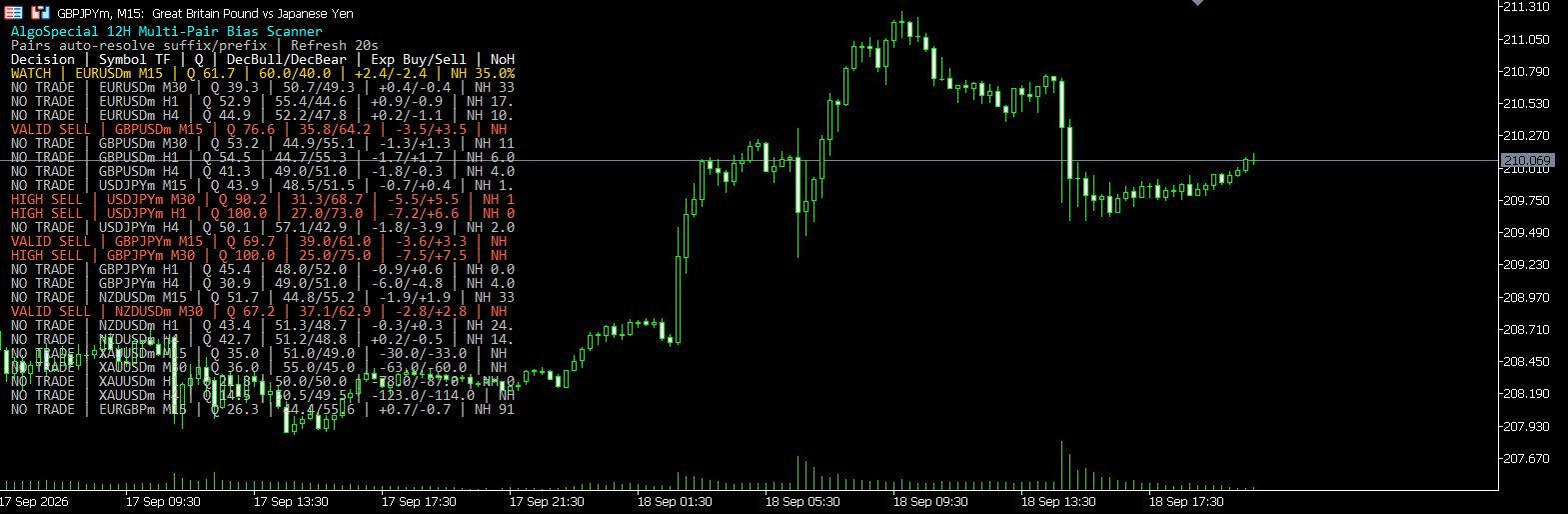
The dashboard displays decision, symbol, timeframe, quality score, decisive bull/bear probability, buy/sell expectancy, no-hit percentage and live TP reference. Red rows indicate sell bias, green rows indicate buy bias, yellow rows indicate watch conditions, and neutral rows show no-trade states.
How the Bias Engine Works
The scanner is not a simple moving-average signal. It builds a feature profile from recent market behavior, then searches historical bars from the same symbol and timeframe for similar contexts. For each nearest case, it checks whether price reached the configured bullish or bearish target within the forward horizon. The result is converted into directional probability, expectancy and a quality score.
| Engine Component | What It Measures | Why It Matters |
|---|---|---|
| ATR and previous range | Recent volatility in pips | Separates quiet candles from wide expansion candles. |
| Body and wick ratios | Candle body, upper wick and lower wick proportions | Helps detect rejection, continuation and exhaustion-style candles. |
| Close position | Where the prior close sits inside the candle range | Shows whether sellers or buyers controlled the last completed bar. |
| Momentum score | Multi-bar close movement normalized by range | Filters whether the current setup is pushing, fading or balanced. |
| Session and time slot | London, New York, late session and minute-of-day context | Historical behavior can differ strongly by session and trading hour. |
| Nearest historical cases | KNN-style selection of the most similar setups | Uses similar past conditions instead of treating every historical bar equally. |
How to Read the Dashboard
Default Inputs
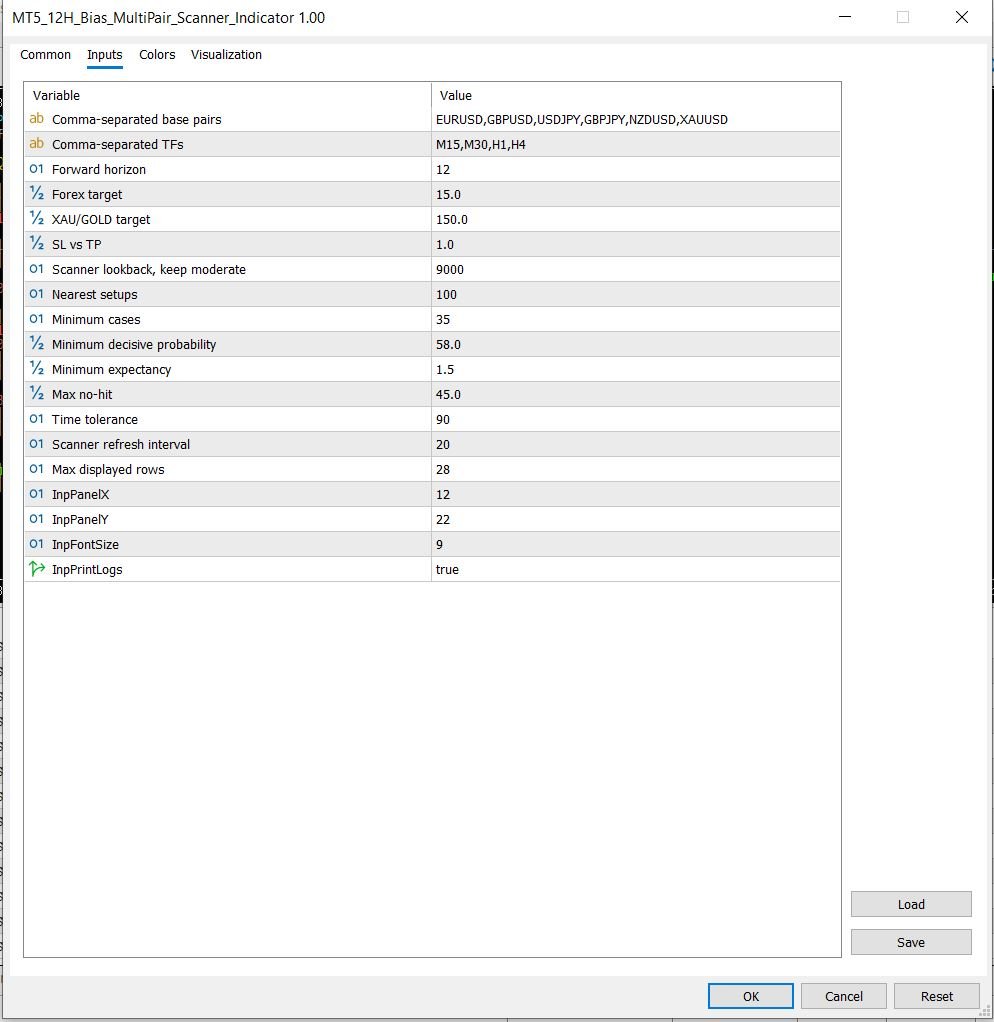
| Input | Default | Meaning |
|---|---|---|
| Comma-separated base pairs | EURUSD,GBPUSD,USDJPY,GBPJPY,NZDUSD,XAUUSD | Markets scanned by the dashboard. Broker suffixes can be auto-resolved. |
| Comma-separated TFs | M15,M30,H1,H4 | Timeframes scanned for each symbol. |
| Forward horizon | 12 | How many future hours historical outcomes are measured against. |
| Forex target | 15.0 pips | Default TP distance for forex pairs. |
| XAU/GOLD target | 150.0 pips | Default TP distance for gold symbols such as XAUUSD. |
| Scanner lookback | 9000 bars | Historical bars requested per symbol/timeframe for similarity matching. |
| Nearest setups | 100 | Maximum nearest historical cases used in the final sample. |
| Minimum cases | 35 | Minimum valid cases required before a symbol/timeframe can produce a result. |
| Minimum decisive probability | 58% | Minimum bull or bear decisive probability required for valid bias. |
| Minimum expectancy | 1.5 pips | Minimum expected edge before a valid buy or sell decision is allowed. |
| Max no-hit | 45% | Rejects setups where too many similar cases did not hit either target. |
| Scanner refresh interval | 20 seconds | How often the dashboard refreshes. |
Best Use Case
Use this indicator as a market-selection and bias dashboard, not as a blind auto-trading system. The strongest workflow is to scan the table, shortlist rows with HIGH or VALID decisions, then confirm structure, liquidity, spread and session context on the chart before taking any trade.
No indicator can predict the market with certainty. Sudden news, spread widening, liquidity events, broker feed differences and unexpected order flow can invalidate historical patterns. Test on demo first and manage risk carefully.
Free Download
Download the compiled MT5 indicator only. The editable `.mq5` source code is not included in the public download.
FAQ
Is this a free MT5 multi-pair scanner?
Yes. The compiled `.ex5` indicator is available as a free download.
Is the MQ5 source code included?
No. Only the compiled `.ex5` file is public. The editable `.mq5` source code is not published.
Does it auto-trade?
No. It is an indicator dashboard. It prints bias and TP reference levels but does not place orders.
Can it handle broker suffixes like EURUSDm?
Yes. It attempts to resolve base symbols against broker symbols, so inputs like EURUSD can match symbols such as EURUSDm when available in Market Watch.
What keywords does this page target?
The page is optimized for MT5 12H bias scanner, MT5 multi pair scanner indicator, forex bias scanner MT5, XAUUSD bias scanner, free MT5 scanner EX5 and multi timeframe scanner MT5.





